You can right click the tab and press Open Preview to create a preview of the markdown on VScode. (So you don't have to read raw markdown)
This task will focus on testing your skills on:
- Basic C (loop and if conditions)
- Array Manipulation (1D and 2D)
- Structs with pointers
- Format String
This task is mainly focused on going through ways arrays can be used practically. (Similar concepts will be very useful when you deal with sensors, cameras, or control systems later on.) We will implement three classic tools: a rolling average, a 1D Kalman filter, and kernel convolution.
Both structs below are provided in Task1.h and are used throughout the task. They are given as is, do not change their fields.
A fixed-capacity 2D array of doubles, plus its dimensions. matrix->data[r][c] is the value at row r, column c (both 0-based).
#define MAX_DIM 16

typedef struct{
    double data[MAX_DIM][MAX_DIM];
    int rows; //number of valid rows (1..MAX_DIM)
    int cols; //number of valid columns (1..MAX_DIM)
} Matrix;The state of a one-dimensional Kalman filter.
typedef struct{
    double estimate;  //current state estimate x
    double error_cov; //current error covariance P
} Kalman;All the functions you must write are in Task1.c. Implement them in that file.
void rolling_average(double* data, int n, int window)We will start with a warmup.
The rolling average (also called a moving average) is a classic (and very simple) way to smooth out a noisy stream of measurements. Instead of using every single reading on its own, we average each reading together with the few readings that came just before it.

data is an array of n sensor readings, and window is how many readings go into each average. The rolling average at index i is the average of the last window readings ending at i, i.e. data[i-window+1 .. i].
- If there are fewer than
windowreadings available (i.e.i < window-1), just average the readings that are available, i.e.data[0 .. i]. - The function should print a header line, followed by one line per reading: the index, the reading, and its rolling average, all to 2 decimal places.
Output example for data = {1, 2, 3, 4, 5}, n = 5, window = 3 (the comments should not appear in the actual implementation, they are only for your reference):
Rolling average (window 3):
Index  Reading   Average
0      1.00      1.00       # index 0
1      2.00      1.50       # index 0, 1
2      3.00      2.00       # index 0, 1, 2
3      4.00      3.00       # index 1, 2, 3 (notice: window = 3, so we remove the oldest data (index 0) when introducing the newest data (index 3))
4      5.00      4.00       # index 2, 3, 4
Another example, for data = {10,00, 12.50, 14.00, 16.50, 20.50}, n = 6, window = 1:
Rolling average (window 1):
Index Reading   Average
0     10.00     10.00       # notice how when window = 1, it is just repeating the index reading.
1     12.50     12.50
2     14.00     14.00
3     16.50     16.50
4     18.00     18.00
5     20.50     20.50
The provided format strings are the in the format required to create the output, so you only have to insert the variables into the format string and uncomment the printf()s.
n >= 1andwindow >= 1.- All readings are valid doubles.
Implement the header and function kalman_init and complete
double kalman_step(Kalman* k, double y, double Q, double R)The rolling average smooths a signal, but it treats every reading equally. The Kalman filter is smarter: it keeps track of both a current estimate of the true value and how confident we are in that estimate. When a new, noisy measurement arrives, the filter blends the measurement with its current estimate, weighting each side by how trustworthy it thinks it is.
The struct Kalman holds the two pieces of state:
- estimate
x— our current best guess of the true value ($\hat{x}$ ). - error covariance
P— our current uncertainty. Bigger = less confident.
kalman_init should simply store the starting estimate and error covariance into the struct pointed to by k. (You will have to write the function header in Task1.h as well!)
This is how the function is called in main.c, to initialise the struct K with the estimate value and error_cov value.
Kalman k;
kalman_init(&k, est, cov);
kalman_step should perform one full filter iteration (predict + update) using the measurement measurement, and return the new estimate.
The 1D equations are below:
In a 2D or 3D environment, the scalars are turned into matrices, and the equations will be much more complicated
Prediction Step:
Estimation Step:
where process_noise is measurement_noise is

Manual example:
Let's say the initial state is 0, 0.1, and 1 ( 0.5.
- We first obtain the prediction
$\hat{x}_{1|0} = 0$ and$P _{1|0} = 1 + 0.1 = 1.1$ - Then, we obtain the Kalman gain of
$k = 1$ ,$K_{1} = \frac{1.1}{1.1+1} = 0.5238...$ - After getting the Kalman gain, we now can obtain the the new predicted value and new error covariance.
- Return
$x=0.2619...$ (Our implementation requires you to update the$x$ and$P$ within the struct passed by pointer, so the data is saved between function calls)
Output example (for initial estimate x = 0, error_cov P = 1, measurements 0.5 1.2 1.0 2.0 2.5, Q = 0.1, R = 1):
Kalman filter output:
Step 1: measurement 0.50 -> estimate 0.26
Step 2: measurement 1.20 -> estimate 0.62
Step 3: measurement 1.00 -> estimate 0.75
Step 4: measurement 2.00 -> estimate 1.12
Step 5: measurement 2.50 -> estimate 1.51
(The outputs above are rounded to 2 decimal places.)
Notice how the first few estimates move quickly toward the measurements, then start trusting the measurements less and less as the filter gains confidence.
process_noiseandmeasurement_noiseare always positive (> 0), so division by zero will not happen.
int convolve(Matrix* input, Matrix* kernel, Matrix* output)Convolution is the workhorse of image processing. A small grid of weights called a kernel is slid over a larger grid (an image / matrix), and at each position the overlapping values are multiplied together and summed. The result is a new matrix.
The kernel is a square grid of odd size k (e.g. 3×3, 5×5). The output value at (r, c) is the sum over the whole kernel of the input values overlapping it:
In other words, we place the top-left corner of the kernel on input[r][c] and add up the element-wise products. (For this task we apply the kernel directly — we do not flip it.)
Because the kernel must fit fully inside the input, the output is smaller than the input:
The function should:
- Compute the convolved result, store it in
output->data, setoutput->rowsandoutput->cols, and return1.
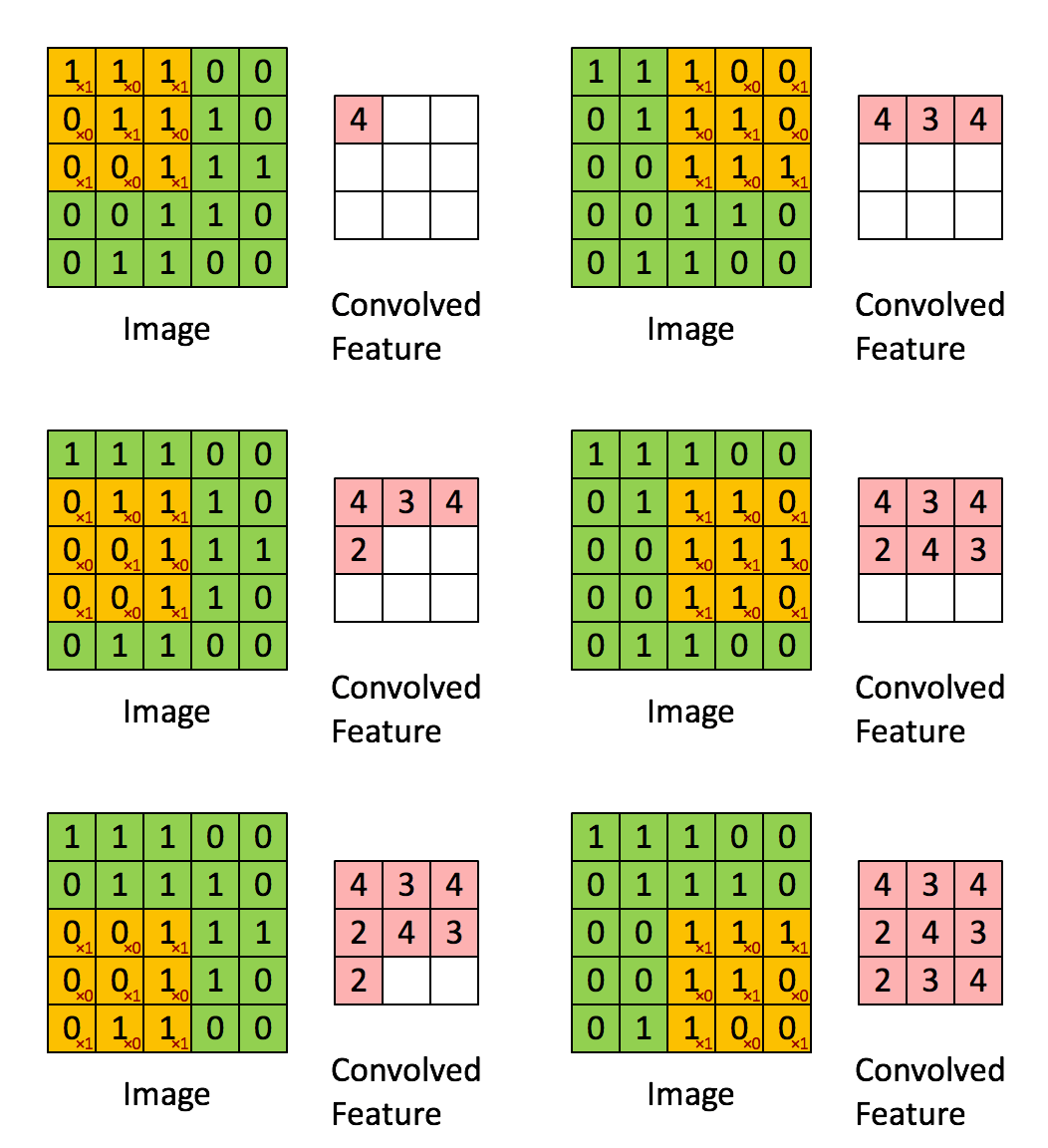
Output example (for a 3×3 input and a 3×3 sharpen kernel 0 -1 0 / -1 5 -1 / 0 -1 0):
Matrix (1 x 1):
5.00input->rowsandinput->colsare between 1 andMAX_DIM, inclusive.- The kernel can fit inside
inputandoutput. - If you learnt convolution from somewhere else, you know that a real convolution requires transposing the kernel, but you will NOT have to do that in this implementation :)
int gaussian_filter(Matrix* input, Matrix* output, int window, double sigma)The applied kernel is called a Gaussian filter, and the effect it has on an image is called a Gaussian blur :) You may use the function
exp()given to you in math.h.
The rolling average smooths a signal, but it weights every reading equally. The Gaussian filter is the classic weighted smoother: instead of a flat average over the neighbourhood, it weights each neighbour by how near it is to the centre, following a bell curve. The centre value matters most, and a neighbour's influence falls off smoothly with distance. This is the standard blur used before edge detection or downscaling.
The weight given to the neighbour at offset (x, y) from the centre is:
where sigma (window × window grid of these weights, then normalised so that all the weights add up to 1. Normalising is what keeps the overall brightness of the matrix unchanged.
For every cell (r, c) of the input:
- Multiply each neighbour by its kernel weight.
- Add the weighted values together.
- Divide by the sum of the kernel weights, and put the result into
output[r][c].
However, you might notice, like in 1A(iii), this would cause the image to shrink. That's why we apply zero padding, and start applying the kernel from the top right corner, and turn all out-of-bounds inputs into 0s.
Matrix A:
1 0
0 1
Zero-padded Matrix A:
0 0 0 0
0 1 0 0
0 0 1 0
0 0 0 0
Notice how there is a ring of 0s surrounding the padded matrix.
However, simply making another matrix to store the zero-padded matrix is space-inefficient. Therefore, you MUST find a way to implement the effect of applying the kernel onto a zero-padded input, without needing to create a new n by n matrix.
The function should:
- Build the normalised kernel
- Compute the blurred result
- Store it in
output, and return1.
Output example (for the 3×3 input 1 1 1 / 1 9 1 / 1 1 1 with window = 3 and sigma = 1, the 9 is now spread over its neighbours instead of being thrown away, and the zero-padded border cells are pulled down):
Matrix (3 x 3):
1.13 1.72 1.13
1.72 2.63 1.72
1.13 1.72 1.13- The kernel can fit inside
inputandoutput. sigmais always positive.windowis at mostMAX_DIM, and is always odd.inputandoutputare of the same dimensions.
int median_filter(Matrix* input, Matrix* output, int window)Same as the Gaussian filter/blur, the operation is called a median filter, and the effect it has on an image is called a median blur :)
The rolling average is a linear smoother. It works great on random noise, but a single wild outlier (e.g. a dead pixel) drags the average around. The median filter fixes that: instead of averaging a neighbourhood, it takes the middle value after sorting the neighbourhood. Outliers get thrown away entirely.
For every cell (r, c) of the input:
- Gather the
window × windowneighbourhood centred on(r, c). - Put the middle value into
output[r][c]. (By either sorting then finding the middle value, or other faster methods)
The function should:
- Compute the median-filtered result, store it in
output, and return1.
Output example (for the 3×3 input 1 1 1 / 1 9 1 / 1 1 1 with window = 3, the lone 9 outlier disappears, and the zero-padded border cells become 0.00):
Matrix (3 x 3):
0.00 1.00 0.00
1.00 1.00 1.00
0.00 1.00 0.00- The kernel can fit inside
inputandoutput. windowis at mostMAX_DIM, and is always odd.inputandoutputare of the same dimensions.
Windows:
gcc -Wuninitialized -std=c99 main.c Task1.c -o Task1
# Then to run the program
./Task1

# Or you can do both at once
gcc -Wuninitialized -std=c99 main.c Task1.c -o Task1; ./Task1
Linux/Mac:
gcc -Wuninitialized -std=c99 main.c Task1.c -o Task1 -lm
# Then to run the program
./Task1

# Or you can do both at once
gcc -Wuninitialized -std=c99 main.c Task1.c -o Task1 -lm && ./Task1
After compiling and running the program, you can play with the interactive menu and test out your program.
From the repository root, run the root test runner. It compiles main.c with
Task1.c, then runs the test cases in Task-1/testcases/:
powershell -ExecutionPolicy Bypass -File .\run_tests.ps1 -Task 1 # Windows
bash ./run_tests.sh 1                                           # macOS / Linux
The runner can also be invoked with a path to the root script from inside the
Task-1 folder: ..\run_tests.ps1 -Task 1 or ../run_tests.sh 1.
Add -b to grade the bonus test cases, add -n to remove the output dump.
Each test folder in testcases/ ships with the exact scripted input (input.txt) and the exact expected output (output.txt), so you can compare your program's output against it.