PC-style production control directly from your phone
Stream • Record • Create • Control • Produce





| 🎮 | 📱 | ⚡ | 🌐 |
|---|---|---|---|
| Multi-Scene | Mobile Native | GPU-Accelerated | Multi-Platform |
| Unlimited scenes | Android optimized | OpenGL ES | Twitch, YouTube, etc. |
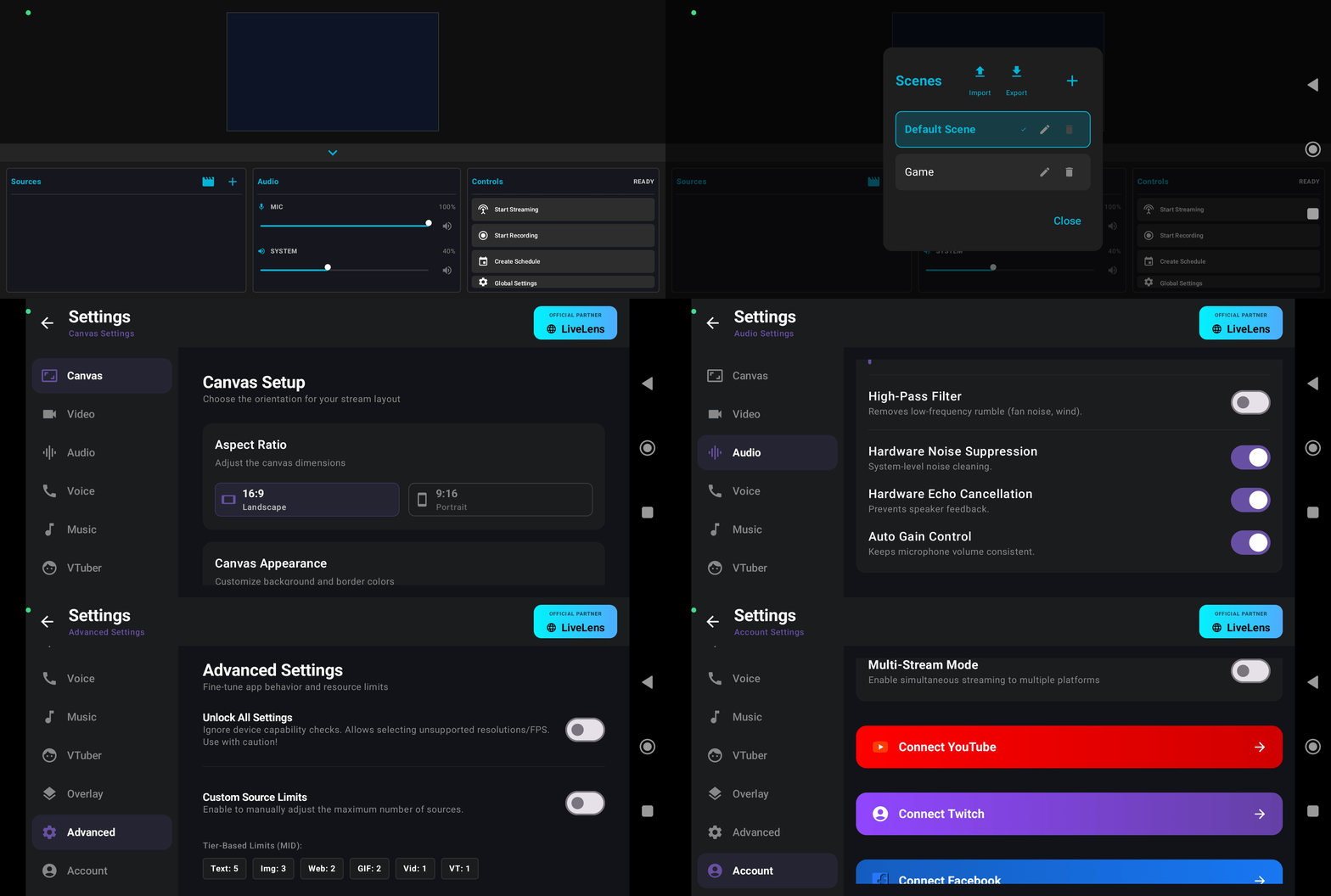
Desktop-Class Production on Mobile → Scroll to explore all features
LiveLens brings OBS-style production workflow to Android creators. It's everything you need for professional streaming, recording, and content creation—all from your mobile device.
Whether you're a gamer, streamer, content creator, VTuber, or influencer, LiveLens gives you enterprise-grade tools without the enterprise price tag.
- 🎮 PC-Quality Control - OBS-like interface on Android
- 🔒 Privacy First - No mandatory accounts, no forced watermarks, no ads
- 🚀 Multi-Stream Ready - Stream to multiple platforms simultaneously
- 🎬 Professional Recording - High-bitrate local recording while streaming
- 🎨 Scene Management - Complex scene setups with ease
- 🎤 Studio-Grade Audio - Advanced audio processing & controls
- 💰 One-Time Purchase - No subscriptions, no recurring fees
- ⚡ GPU-accelerated via OpenGL ES
- 🎯 Optimized FBO-based pipeline for mobile
- 🔄 Real-time transformations (scale, rotate, crop, layer)
- 🖼️ Single scene composition for preview, streaming & recording
- 🎨 Hardware acceleration for smooth 60 FPS
- 🌐 Custom RTMP URLs with multi-stream support
- 📺 Direct streaming to Twitch, YouTube, Facebook & major platforms
- 📹 4K recording with 30/60 FPS support
- ⚙️ H.264/H.265 encoder selection
- 🎚️ Fine-tune bitrate & keyframe intervals
- 🎯 Adaptive quality based on device performance
- 🔄 Network failover & reconnection handling
- 📋 Unlimited scene creation & organization
- 🖼️ 10+ Source Types: Screen • Text • Image • Camera • Video • Web • GIF • VTuber • Audio • Timer
- ✏️ Edit live while streaming/recording
- 🔒 Lock, hide, reorder sources instantly
- 📐 16:9 & 9:16 canvas with smart alignment guides
- 🎨 Drag-drop interface with precision tools
- 🔗 Scene linking & template system
- 🎚️ Capture microphone + system audio simultaneously
- 🔊 Mono/Stereo input support (auto-fallback)
- 🛡️ Noise suppression & echo cancellation
- 📈 Automatic gain control & noise gate
- 🔊 Real-time audio monitoring with meters
- 🎵 Floating audio level adjusters
- 🔊 Multi-channel audio mixing
- 🔔 Custom BRB & Starting Soon screens
- ⏱️ Customizable countdown timers with animations
- 🎵 Background music integration
- 🌈 Full styling control for text & timers
- 💬 Notification & floating controls
- 📤 Import/Export JSON theme customization
- 🎭 Custom stinger/transition effects
- 📦 Live2D Cubism support (up to v5.1)
- 🎤 Real-time microphone lip-sync
- 🎭 Physics simulation & expressions
- 👆 Touch tracking for interactions
- ⚙️ Real-time parameter editor
- 🎬 Breathing & idle motion controls
- 🎨 Character animation blending
- 🚀 Account-free voice rooms
- 🔗 Deep-link sharing for instant joins
- 💻 Cross-app communication (LiveLens ↔ Lite)
- 🤝 Team coordination with low-latency audio
- 👥 Multi-user support
| Feature | LiveLens | Many Mobile Streaming Apps |
|---|---|---|
| 🎬 Multi-Scene Support | ✅ | |
| 📱 Mobile Native | ✅ | ✅ |
| 🎭 Live2D / VTuber Support | ✅ | ❌ / Limited |
| 🌐 Web Source Support | ✅ | |
| 🖼️ Image & GIF Sources | ✅ | ✅ |
| 🎥 Video Sources | ✅ | |
| 📝 Advanced Text Editor | ✅ | |
| 🎙️ Voice Chat Integration | ✅ | ❌ |
| 🎵 Background Music | ✅ | |
| 📺 Internal Audio Capture | ✅ | |
| 🧩 Scene Import / Export | ✅ | ❌ / Limited |
| 🎮 Adaptive Performance | ✅ | |
| 🚫 Watermark | ❌ None | |
| 🔐 Account Required | ❌ No | |
| ⚡ GPU Rendering | ✅ | ✅ |
| 💻 Desktop Sync | ✅ | ❌ |
| 🎓 Learning Resources | ✅ |
- Android Version: Android 10 or higher (Required)
- RAM: 4GB minimum (6GB+ recommended)
- Storage: 100MB free space
- Camera: Any camera with recording capability
- Microphone: Built-in or external
- Android Version: Android 12+
- RAM: 8GB or higher
- Processor: Snapdragon 888 or equivalent
- Storage: 256GB+ for high-bitrate recording
- Network: 10+ Mbps upload speed for streaming
- ✅ Twitch
- ✅ YouTube Live
- ✅ Facebook Live
- ✅ Instagram Live (via RTMP)
- ✅ Custom RTMP servers
- ✅ OBS-compatible services
- 📱 Android Only - Full support for Android 10+
- 🚫 iOS - Not available
- 🚫 Windows/Mac - Not available
- 🚫 Web - Not available
| Device Type | Max FPS | Max Resolution | Recommended Bitrate |
|---|---|---|---|
| Mid-Range (4-6GB RAM) | 30 FPS | 720p | 2-3 Mbps |
| High-End (8GB RAM) | 60 FPS | 1080p | 4-5 Mbps |
| Flagship (12GB+ RAM) | 60 FPS | 4K | 8-12 Mbps |

Visit LiveLens.live to download the latest APK
- Visit https://www.livelens.live/
- Download the APK file
- Go to Settings → Security → Enable "Unknown Sources"
- Install the APK file
- Launch LiveLens and grant required permissions
Visit livelens.live → Download APK → Install on Android device
- Grant necessary permissions (Camera, Microphone, Storage)
- Select your default canvas size (16:9 or 9:16)
- Configure audio input sources
- Tap "+" → Create new scene
- Add a camera source
- Add text overlay (e.g., "Channel Name")
- Arrange sources using drag-and-drop
- Go to Settings → Streaming
- Enter RTMP URL from your platform
- Set bitrate, FPS, resolution
- Tap "Go Live"
- Preview your scene on screen
- Adjust sources in real-time
- Monitor audio levels
- Watch your chat
- 🔄 Scene switching unavailable during active stream/record
- 📊 Max quality & source count depend on device performance
- 🎬 Some Android system capture limitations apply
- 🌐 Web sources may load slower on slower devices
- Language: Kotlin/Java
- Rendering: OpenGL ES 3.0+
- Video Encoding: MediaCodec API
- Audio Processing: OpenSL ES
- RTMP Protocol: Custom optimized implementation
- Live2D: Cubism Native SDK
- UI Framework: Android Jetpack Compose
- Event-Driven Pipeline - Real-time source management
- Dual-Context Rendering - Separate preview & encode contexts
- Memory-Efficient Buffer Pool - Reduced GC pressure
- Adaptive Bitrate Control - Automatic quality adjustment
- Network Resilience - Automatic reconnection with backoff
| Resource | Link |
|---|---|
| 📖 Full Documentation | Read Docs |
| ❓ FAQ & Troubleshooting | FAQ |
| 🎬 Video Tutorials | YouTube Playlist |
| 🎨 Theme Customization | Overlays |
| 🔧 Advanced Settings | Config Guide |
| 🚀 API Reference | API Docs |
| 📖 Resources | |
|---|---|
| 💬 Community Chat | GitHub Discussions |
| ❓ FAQ & Help | Frequently Asked Questions |
| 🌐 Official Website | livelens.live |
| ✨ All Features | Feature Showcase |
| 🎨 Themes | Floating Control Themes |
| 🎤 Voice | Voice Chat Demo |
| 💬 Discord | Join Server |
| 📧 Contact | Support & Feedback |
| ❤️ Sponsor | |
"LiveLens completely changed how I stream from my phone. It's like having OBS in my pocket!"
— Gaming Streamer, Twitch Affiliate
"The Live2D support is incredible. Finally, a mobile app that treats VTubers seriously!"
— VTuber Content Creator
"Best investment I made for mobile streaming. The quality is professional-grade!"
— YouTube Content Creator
Found an issue or have an idea? We'd love to hear from you! Choose your issue type:
Check FAQ & existing issues first, then report here
- Include: Device info, version, steps to reproduce, error logs
Browse existing requests to avoid duplicates, then request here
- Describe: Feature, problem it solves, proposed solution
- Include: Bitrate, resolution, FPS, internet speed
- Include: Bitrate, resolution, FPS, device specs
- Describe: Audio issue, settings used
- Include: Model format, Cubism version, specific issue
Created & Maintained by: ByconStudio
- OpenGL ES community for rendering guidance
- Live2D for Cubism SDK
- Android Media Framework team
- All contributors and testers
All rights reserved © LiveLens

This project is not open-source.
Unauthorized copying, distribution, or derivative works are strictly prohibited.
For licensing inquiries, contact: support@livelens.live
Thank you to all our creators, testers, and community members who make LiveLens better every day!


