
The Ai.Mi App is a companion app that runs alongside Omega Strikers. It is developed right here on GitHub by the makers of ClarionCorp, a stats tracking database for Omega Strikers.
The goal is to provide you with additional insight into your game. Though keep in mind, it is NOT intended to give players an unfair advantage, just nice-to-haves (QoL).

- Automatically fetch the rank of your opponents
- Track awakening pool and current selections
The live match summary will automatically fetch the Name, Character, Rating, Rank, and WinRate of every player in the game. It will also show what awakenings are currently in rotation, and which ones have already been selected or shown.
The app will automatically save completed games and be viewable completely in-app. This process only takes a couple of seconds after a match has finalized, and is much more detailed than its online counterparts.
| Ai.Mi App | ClarionCorp | Omega Stats | |
|---|---|---|---|
| Map | ✅ | ✅ | ✅ |
| Duration | ✅ | ✅ | ✅ |
| Average Rank | ✅ | ✅ | ✅ |
| Bans | ✅ | ✅ | ✅ |
| Character | ✅ | ✅ | ✅ |
| Rank | ✅ | ❌ | ❌ |
| Username | ✅ | ✅ | ❌ |
| Role | ✅ | ✅ | ✅ |
| MVP | ✅ | ✅ | ✅ |
| Level | ✅ | ✅ | ✅ |
| Scores | ✅ | ✅ | ✅ |
| Assists | ✅ | ✅ | ✅ |
| Saves | ✅ | ✅ | ✅ |
| Knockouts | ✅ | ✅ | ✅ |
| Damage | ✅ | ❌ | ❌ |
| Shots | ✅ | ❌ | ❌ |
| Redirects | ✅ | ❌ | ❌ |
| Orbs | ✅ | ❌ | ❌ |
| Starting Gear | ✅ | ✅ | ✅ |
| Awakenings | ✅ | ✅ | ✅ |
| ALL Modes | ✅ | ❌ | ❌ |
The default OS Rich Presence kind of sucks. Just says you're playing OS and for how long. Our custom Rich Presence is fully dynamic based on what you are doing. Whether it's queuing, playing (live score!), or just sitting in the lobby, your friends on discord will be updated on it!
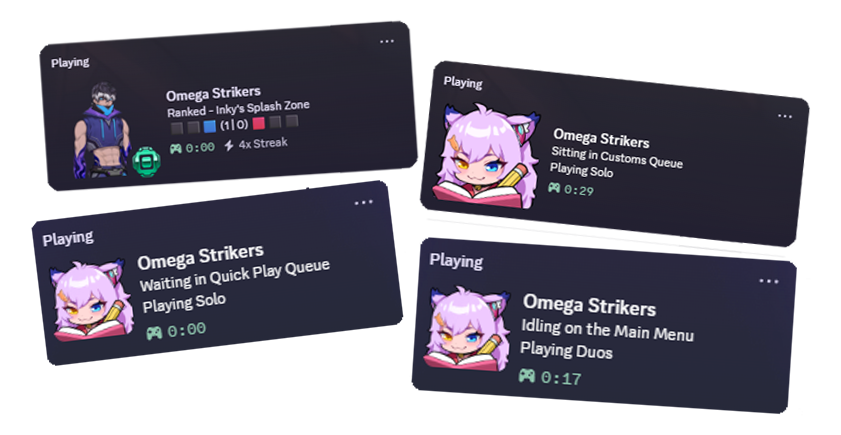
Everyone using the app will have their gamestate periodically sent to the Ai.Mi API. This way, we can show a counter inside the app for how many people are currently playing. 😃
We plan to add an option in settings in the future (before v2 release) to opt-out since we know some people don't like that sort of thing very much. 🩷
No more fussing around with manually keeping track of your pak files. With this, you can view your currently installed mods, as well as download new ones straight from GameBanana.
Custom Game Manager is a tool currently hosted on ClarionCorp. Though, prepping the Auth file can be annoying, so we're bringing CGM to the Ai.Mi App to do it all automatically!
Explore other queues that are available in the game for some reason. We also may work with Event Organizers to introduce custom queues or matchmaking.
v2 was built from the ground up to rely heavily on custom UE4SS mods that hook into the game directly. Upon launching the app, it will check for UE4SS and current mod versions. If UE4SS is undetected or outdated, it will automatically install a very minimized version of UE4SS to the game's directory.
If that doesn't sit right with you, do not use this app. This game doesn't have an anti-cheat, so none of this should get you banned or anything. 🤷
Built with Tauri, the Ai.Mi App uses just less than 10 MB of RAM currently. The package size is around 50 MB, but most of that is images used inside the app. Some images are retrieved from the cloud to minimize this footprint.
During pre-release development, only standalone versions of the app will be shipped. So, just download it and run it, really. For releases, you can either download the standalone, or if you want automatic updates you can download the installer (setup). All downloads can be found in releases.
All linux need to add the following arguments to their game's steam launch options. You can find this by opening steam, clicking Omega Strikers, clicking the cog gear on the right, Properties, and pasting this line in "Launch Options". This is required for the modloader to be able to hook into Proton.
WINEDLLOVERRIDES="dwmapi=n,b" %command%As for the release files, if you are on Debian, Ubuntu, or Mint you should use the .deb. If you are on Fedora or Bazzite, use the .rpm. Any and all other distributions can use the .AppImage. Also, the app only works if OS is installed to the default location (~/.steam/).
If you wish to uninstall, just run your operating system's uninstaller. (Search Add or Remove Programs in Windows Search)
Keep in mind that if you uninstall the App (or decide to stop using it), UE4SS will continue to be installed. To uninstall UE4SS, open Settings and click the button at the bottom labeled "Uninstall UE4SS". It will delete the mod files, then close the app. You can now remove the app from your system.
Don't trust my versions? That's fine lol. Or maybe you are wanting to try making a theme or adding features?
- Clone the repo or download whichever
Source.zipyou want in releases. - Make sure you have NodeJS 24 or higher installed on your system. Then enable
pnpmwithcorepack enable pnpm. - Open the pulled repo in your terminal, and run
pnpm ito install the packages. - When finished, run
pnpm approve-buildspressAon your keyboard, then pressENTER. - Next install Rust on your system.
- Run
pnpm tauri devto run a live version of the app from your IDE/terminal. - Once you want to try building an executable (for your platform), run
pnpm tauri build(linux usespnpm tauri:linux).- These are what are bundled in the releases, so if you JUST want a version to use, use this.
- The file(s) can be found in
src-tauri/target/releasewhen finished.
The Official ClarionCorp Discord is probably the best way to reach us. Don't hesitate to tag @blals in any OS-related Discord Server though.
For Bug Reports, either create a forum post on the CC Discord (in the bugs channel), or create a new issue on GitHub. Currently, I am just one man working on this for free, so there is no public roadmap and some bugs may take a while to get fixed. 🙏