SD カードに置いた PNG セットでアバターを差替できます。複数スキンを切替可能で、選択は NVS に永続化されます。Emotion ごとの装飾 (Heart / Shy / Dizzy / Sleepy / Doubt) や HeadPet 演出にも対応。詳細は Avatar.md を参照。
M5Unit-NFC を opt-in で接続でき、stackchan:cmd MIME を持つ NDEF タグから JSON コマンドを発火できます (head 動作 / dance / emotion 切替 等)。デフォルトでは無効 (AI Agent 中の audio 安定性への影響と DRAM 消費のため)。使用するには 2 段階の有効化が必要です:
- コンパイル時に有効化:
sdkconfigでCONFIG_GOB_FORK_ENABLE_NFC=yを設定 (idf.py menuconfig→ Top → "GOB Fork" → "Enable NFC")。詳細は「ビルド前の注意 → 3. GOB Fork コンパイル時オプション」を参照。 - 実行時に有効化: GOB FORK menu → NFC を ON にして再起動。
詳細は NFC.md を参照。
12H / 24H 切替、TZ 設定 (NVS 永続化)、SNTP 同期に対応。
発話に合わせて吹き出し内の text を末尾に追従させる tail-follow scroll。長文は 句読点ベースで適度に chunk 化し、bubble に収まらない部分は左へスライドして末尾文字を見せます。TTS の音声と完全にリアルタイム同期しているわけではありません — 表示は LLM の chunk 配信タイミングと内部の segment timer に依存し、音声の音素単位での追従ではありません。発話完了後 3 秒で自動 dismiss。GOB FORK menu → Bubble FX で ON / OFF 切替可能 (NVS 永続、再起動不要)。OFF にすると upstream 1.3.0 互換の LVGL ネイティブ SCROLL_CIRCULAR 挙動に戻ります。
Launcher のメニュー画面 で無操作が続いた場合のスクリーンセーバー起動までの時間を、GOB FORK menu → Screensaver Settings から Off / 30 秒 / 1 分 / 5 分 / 10 分 で選択可能 (NVS 永続)。AI Agent 起動中など他の画面には適用されません。
launcher 画面に専用 app を追加し、Skin Browser / SD Card Info / System Info / Screensaver 設定 / About / NFC・Bubble FX・Error Toast の各 toggle を一括管理できます。
Swap the avatar with a PNG set placed on the SD card. Multi-skin selection is persisted in NVS. Per-emotion decorators (Heart / Shy / Dizzy / Sleepy / Doubt) and the HeadPet animation are supported. See Avatar.md for details.
Optional M5Unit-NFC support: NDEF tags with the stackchan:cmd MIME type trigger JSON commands (head motion / dance / emotion switch, etc.). Disabled by default (to keep AI Agent audio stable and save DRAM). Two-stage enablement is required:
- Compile-time: set
CONFIG_GOB_FORK_ENABLE_NFC=yinsdkconfig(idf.py menuconfig→ Top → "GOB Fork" → "Enable NFC"). See "Pre-build Notes → 3. GOB Fork compile-time toggles" for details. - Runtime: GOB FORK menu → flip NFC to ON and reboot.
See NFC.md for details.
12H / 24H toggle, timezone setting (NVS-persisted), and SNTP synchronization.
Tail-follows the utterance inside the bubble: long sentences are chunked at punctuation boundaries, and overflow scrolls left to keep the latest characters visible. Not strictly synced with TTS audio in real time — display follows LLM chunk delivery and the internal segment-timer cadence rather than per-syllable timing. Auto-dismisses 3 seconds after completion. Toggle via GOB FORK menu → Bubble FX (NVS-persisted, no reboot). When OFF, behavior reverts to upstream 1.3.0-compatible LVGL native SCROLL_CIRCULAR.
Pick the screensaver activation timeout (Off / 30 sec / 1 min / 5 min / 10 min) via GOB FORK menu → Screensaver Settings (NVS-persisted). Applies only while the launcher menu is foreground; AI Agent and other screens are unaffected.
Adds a dedicated app to the launcher that consolidates Skin Browser / SD Card Info / System Info / Screensaver Settings / About / NFC / Bubble FX / Error Toast toggles in one place.
本 fork (GOB fork) と公式ファームウェアを行き来する際、公式ファームウェアの書き戻し (M5Burner 等) や NVS partition の事故的破損 により、Wi-Fi / xiaozhi 接続情報など各種設定がリセットされる可能性があります。あらかじめ NVS partition (16 KB, offset 0x9000) のバックアップを取っておくことを推奨します。
# バックアップ (任意のタイミング、書き込み前推奨) esptool.py --port /dev/tty.usbmodemXXXX --baud 460800 read_flash 0x9000 0x4000 nvs_backup.bin # リストア (設定が消えた / 壊れたとき) esptool.py --port /dev/tty.usbmodemXXXX --baud 460800 write_flash 0x9000 nvs_backup.binなお、公式 → fork 方向 (
idf.py flash等) では NVS は自動的に引き継がれます (app partition のみ書き換わるため)。バックアップが特に効くのは fork → 公式 (M5Burner 経由) や NVS が破損したケースです。
When switching between this fork (GOB fork) and the official firmware, settings such as Wi-Fi and xiaozhi connection info may be lost — either via M5Burner re-flashing the official firmware (which overwrites NVS) or via accidental NVS partition corruption. We recommend backing up the NVS partition (16 KB at offset 0x9000) in advance.
# Backup (any time; recommended before flashing)
esptool.py --port /dev/tty.usbmodemXXXX --baud 460800 read_flash 0x9000 0x4000 nvs_backup.bin

# Restore (when settings are lost or NVS is corrupted)
esptool.py --port /dev/tty.usbmodemXXXX --baud 460800 write_flash 0x9000 nvs_backup.bin
Note that the official → fork direction (e.g.
idf.py flash) preserves NVS automatically because only the app partition is rewritten. The backup matters mainly for the fork → official direction (via M5Burner) or NVS corruption recovery.
GOB fork をビルドする前に以下を実施してください。
外部依存 (xiaozhi-esp32 等) を取得し、本 fork が必要とする patch を適用します。
cd firmware
python3 ./fetch_repos.py
必要なタイミング:
- 初回 clone 後
firmware/repos.jsonまたはfirmware/patches/配下の patch を更新したときfirmware/xiaozhi-esp32/を消してやり直したいとき
本 fork は sdkconfig.defaults で FATFS の Long File Name (LFN) を有効化しています (公式は OFF)。sdkconfig.defaults は firmware/sdkconfig が存在しないときだけ参照されるため、既存ビルド環境ではそのままだと反映されません。
rm firmware/sdkconfig必要なタイミング:
- 公式 → 本 fork へ切替えた直後 (LFN を含む defaults 変更を取り込むため)
firmware/sdkconfig.defaultsを更新したときidf.py fullcleanはbuild/のみ消すのでsdkconfigは別途削除が必要
削除すると自分の設定が消えてしまうため、idf.py menuconfig で以下を手で有効化してください:
| 設定 | menuconfig パス |
|---|---|
CONFIG_FATFS_LFN_STACK=y |
Component config → FAT Filesystem support → Long filename support → Long filename buffer in stack |
CONFIG_FATFS_MAX_LFN=255 |
Component config → FAT Filesystem support → Max long filename length = 255 |
(両方未設定だと /sdcard/eye_right_closed.png 等の長いファイル名が開けず、Skin が DefaultAvatar に fallback します。)
本 fork は一部機能をコンパイル時に有効/無効化できます (firmware/main/Kconfig.projbuild):
| Kconfig | デフォルト | 内容 |
|---|---|---|
CONFIG_GOB_FORK_ENABLE_ERROR_TOAST |
n (OFF) | ESP_LOGE を赤 Toast で画面表示 (whitelist: MCP / MQTT / Application / OTA / WifiStation)。 |
CONFIG_GOB_FORK_ENABLE_NFC |
n (OFF) | M5Unit-NFC poll task + NDEF dispatcher。I2C bus を audio codec と共有するためデフォルト OFF。 |
切替方法:
cd firmware
idf.py menuconfig
# Top-level menu → "GOB Fork" → toggle
VS Code (ESP-IDF Extension) の場合:
Cmd+Shift+P→ESP-IDF: SDK Configuration Editor (Menuconfig)を選択- 検索ボックスで
GOBと入力 → 該当 entry のチェックボックスで切替 → 右上 Save
注意: OFF にした機能は完全にコード除外されるため、対応する GOB FORK menu 項目 (Error Toast / NFC) も非表示になります。NVS 設定は意味を持ちません。
Before building this fork, please run the following.
Fetches external deps (xiaozhi-esp32 etc.) and applies fork-specific patches.
cd firmware
python3 ./fetch_repos.py
When required:
- After the initial clone
- After updating
firmware/repos.jsonor any patch underfirmware/patches/ - When you want to wipe
firmware/xiaozhi-esp32/and start over
This fork enables FATFS Long File Name (LFN) in sdkconfig.defaults (the official fork has it OFF). sdkconfig.defaults is only consulted when firmware/sdkconfig is absent, so an existing build env will not pick up the change unless you delete it.
rm firmware/sdkconfigWhen required:
- Right after switching from the official firmware to this fork
- After modifying
firmware/sdkconfig.defaults - Note:
idf.py fullcleanonly wipesbuild/, sosdkconfigmust be removed separately.
Deleting it would discard your settings, so enable the following manually with idf.py menuconfig:
| Setting | menuconfig path |
|---|---|
CONFIG_FATFS_LFN_STACK=y |
Component config → FAT Filesystem support → Long filename support → Long filename buffer in stack |
CONFIG_FATFS_MAX_LFN=255 |
Component config → FAT Filesystem support → Max long filename length = 255 |
(Without both, long filenames such as /sdcard/eye_right_closed.png cannot be opened and the skin falls back to DefaultAvatar.)
This fork exposes optional features behind compile-time toggles (firmware/main/Kconfig.projbuild):
| Kconfig | Default | Description |
|---|---|---|
CONFIG_GOB_FORK_ENABLE_ERROR_TOAST |
n (OFF) | Surface ESP_LOGE from a TAG whitelist (MCP / MQTT / Application / OTA / WifiStation) as a red Toast. |
CONFIG_GOB_FORK_ENABLE_NFC |
n (OFF) | M5Unit-NFC poll task + NDEF dispatcher. OFF by default to avoid I2C bus contention with the audio codec. |
How to toggle:
cd firmware
idf.py menuconfig
# Top-level menu → "GOB Fork" → flip
Using VS Code (ESP-IDF Extension):
Cmd+Shift+P→ selectESP-IDF: SDK Configuration Editor (Menuconfig)- Type
GOBin the search box → flip the checkbox → click Save
Note: When OFF, the feature is fully compiled out, the related GOB FORK menu entries (Error Toast / NFC) are hidden, and the corresponding NVS settings have no effect.
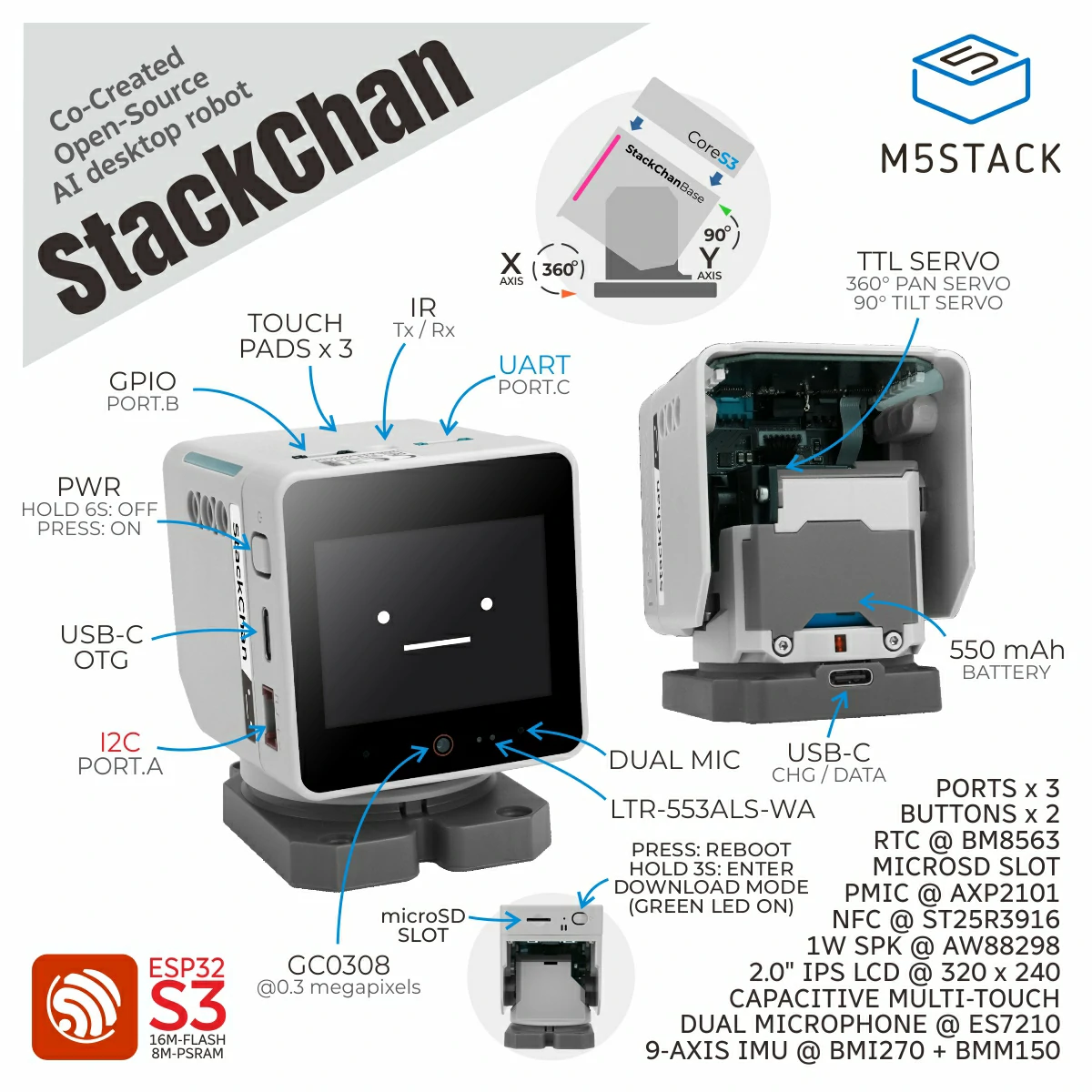
Here are StackChan related open-source resources, including source code of the StackChan firmware, remote controller firmware, mobile app (iOS and Android), and server.
Update of this repo could be a little late than the released firmware and mobile app.

StackChan is a super kawaii AI desktop robot co-created by M5Stack and the user community. It uses the M5Stack flagship IoT development kit CoreS3 as its main controller, powered by an ESP32-S3 SoC featuring a 240 MHz dual-core processor, with 16MB Flash and 8MB PSRAM onboard, and supporting Wi-Fi and BLE. The main unit also integrates a 2.0-inch capacitive touch display with a high-strength glass cover, a 0.3 MP camera, a proximity & ambient light sensor, a 9-axis IMU (accelerometer + gyroscope + magnetometer), a microSD card slot, a 1W speaker, dual microphones, and power/reset buttons.
The robot body, connected to the main unit, includes a USB-C interface for power and data, a 550 mAh battery, two feedback servos (360-degree continuous rotation on the horizontal axis and 90-degree movement on the vertical axis), two rows totaling 12 RGB LEDs, infrared transmitter and receiver, a three-zone touch panel, and a full-featured NFC module.
The factory firmware is feature-rich, including an AI Agent, lively and expressive animations, ESP-NOW wireless remote control, and online app downloads. It can connect to a mobile app for video viewing, remote avatar control, and more, and also supports online updates (OTA). The product also supports programming via Arduino, UiFlow2, and other methods, and can connect to various expansion units in the M5Stack ecosystem, making it easy to implement a wide range of custom functions.
⚠️ Do not forcibly rotate any movable parts connected to the motors by hand when you are unsure whether the motors are powered and under control, as this may cause hardware damage.
-
Purchase link: M5Stack Official Store | 淘宝 Taobao
-
Board support package: https://github.com/m5stack/StackChan-BSP
Thank you to the contributors of the StackChan community, especially:
 |
 |
|---|---|
| @stack_chan | @mongonta555 |
| Shinya Ishikawa | Takao Akaki |