
NeurIPS 2025



Zhening Huang1, Xiaoyang Wu2, Fangcheng Zhong1, Hengshuang Zhao2, Matthias Nießner3, Joan Lasenby1
1University of Cambridge 2The University of Hong Kong 3Technical University of Munich
- [2026-08-07] 🚀 Check out our new work, LiteReality-Agent — an open-source toolkit that turns a phone scan into an interactable indoor 3D scene as editable Python code, together with our own free iOS scanner app. See the project page, the code, and the free iOS app!
- [2026-05-01] Full rendered footage and evaluation code for reproducing Table 2 & Table 3 are now available for download!
- [2026-01-19] LiteReality code is out! Test it with the example scans (Instructions, results visualization), or your own scans!
- [2025-09-18] LiteReality has been accepted at NeurIPS 2025!
- [2025-07-03] Our paper is now available on arXiv! Check out the video demo.
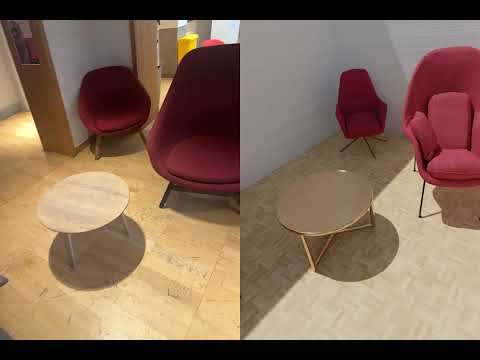
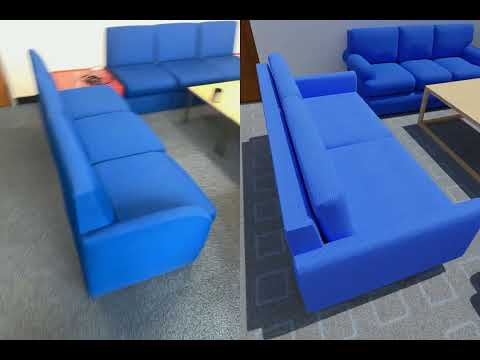
We tested this codebase with several example scans; here are some of the results (Left: RGB, Right: LiteReality Reconstruction). Click on any thumbnail to watch the full video 🎬.
| Girton Study Room | Darwin BedRoom | CUED BoardRoom |
|---|---|---|
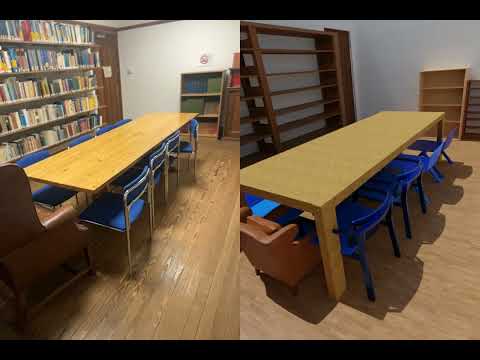 |
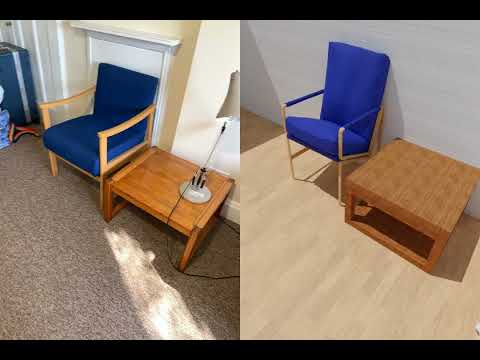 |
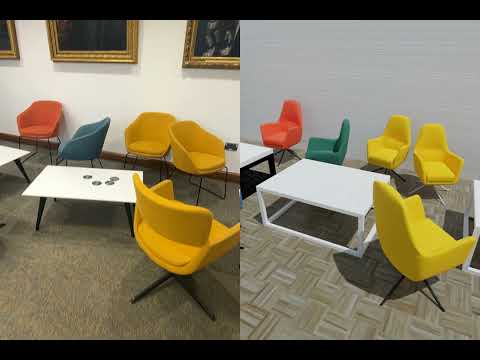 |
| Girton Study Room 2 | Girton Common Room | SigProc Tea Room |
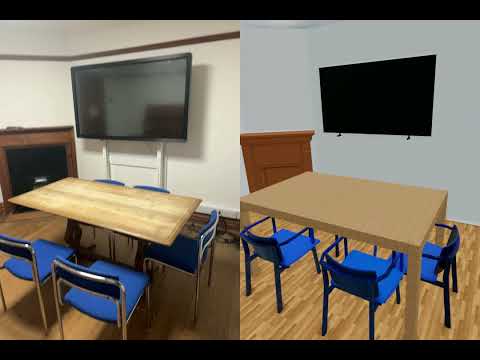 |
 |
 |
Reproducing Paper Results (Table 2 & Table 3): To reproduce the quantitative results reported in Table 2 and Table 3 of the paper, please download the full rendered footage and evaluation code here.
- Linux machine
- Conda
- NVIDIA RTX-enabled GPU (≥ 24 GB VRAM)
- CUDA 12.x or 11.x
git clone https://github.com/LiteReality/LiteReality.git
cd LiteReality

conda create -n litereality python=3.9 -y
conda activate litereality

pip install torch torchvision torchaudio --index-url https://download.pytorch.org/whl/cu124
pip install -e .Note: The GroundingDINO code in this repository includes patches for compatibility with PyTorch 2.5.1+ and CUDA 12.4.
mkdir third_party
cd third_party
git clone https://github.com/IDEA-Research/GroundingDINO.git
cp ../litereality/utils/setup_grounding_dino.py GroundingDINO/setup.py # replace setup.py with this file for easy installation

cd GroundingDINO

# Install dependencies
pip install -r requirements.txt
conda install -c conda-forge gcc=13 gxx=13 -y
pip install -e . --no-build-isolation
cd ../..
If issues persist, please refer to the official GroundingDINO repository.
This script downloads weights for CLIP, DinoV2, Qwen-VL-8B-Instruct, and SAM.
python litereality/utils/download_pretrained_weights.pybash litereality/utils/install_blender.sh(This might take quite a while!)
This downloads and extracts the material database (~200 GB) to ./litereality_database/.
python litereality/utils/litereality_database_download.py
cp -r asset/pbr_annotations/* litereality_database/PBR_materials/material_lib/annotations/ # Important: Replace the existing annotations with the new annotation JSON filesThis downloads example scans to the ./scans/ directory.
python litereality/utils/download_example_scans.pyAfter downloading the database and example scans, run the full test suite:
bash example_scans_test.shOr test on a single example first:
bash script.sh scans/2025_05_05_08_42_28 Darwin_BedRoomCurrently, data capture uses Apple RoomPlan on a LiDAR-equipped iPhone. We use the 3D Scanner App to capture full images, depth, camera data, and RoomPlan raw outputs. Follow the video below:

Once you export all data, save it under the scans/ folder, then run:
bash script.sh scans/{your_scan_name} {scene_name}Example:
bash script.sh scans/2025_01_20_08_44_07 BoardRoom_CUEDContains material painting results for each processed scene:
{scene_name}/- Per-object material assignments and textures{scene_name}_output_gltf/- GLTF exports with applied PBR materials
Contains intermediate object-level processing results:
{scene_name}/- Individual reconstructed objects before material painting
Final integrated scene models ready for rendering:
blender/- Native Blender project files (.blend) for the reconstructed sceneglb/- 3D scene files (.glb) with full PBR materials for the reconstructed scene
Rendered visualizations and videos of the complete scenes:
videos/- Side-by-side comparison with the original RGB-D inputsrendered_rgbd/- Rendered images from reconstructed scene
Cache files are saved under ./cache/, where you can inspect:
- Scene-graph and parsed scene (before and after)
- Object clustering (e.g., chairs)
- Object retrieval results
- Material painting results
The following works have been helpful and inspirational for the creation of LiteReality:
- Make-it-Real: Unleashing Large Multimodal Model for Painting 3D Objects with Realistic Materials
- MatSynth: A Modern PBR Materials Dataset
- Qwen3-VL: Alibaba's Vision-Language Model
- Phone2Proc: Bringing Robust Robots Into Our Chaotic World
- 3D-FUTURE: 3D Furniture Shape with TextURE
- AI2-THOR: An Interactive 3D Environment for Visual AI
- Apple RoomPlan: ARKit 6 framework for 3D floor plans
If you find this project useful for your research, please cite:
@inproceedings{huang2025litereality,
  title={LiteReality: Graphics-Ready 3D Scene Reconstruction from RGB-D Scans},
  author={Zhening Huang and Xiaoyang Wu and Fangcheng Zhong and Hengshuang Zhao and Matthias Nießner and Joan Lasenby},
  booktitle={Advances in Neural Information Processing Systems (NeurIPS)},
  year={2025}
}