Repository navigation
2.3.68 Satellite OpenCode
Handle:
opencode
URL: http://localhost:34711
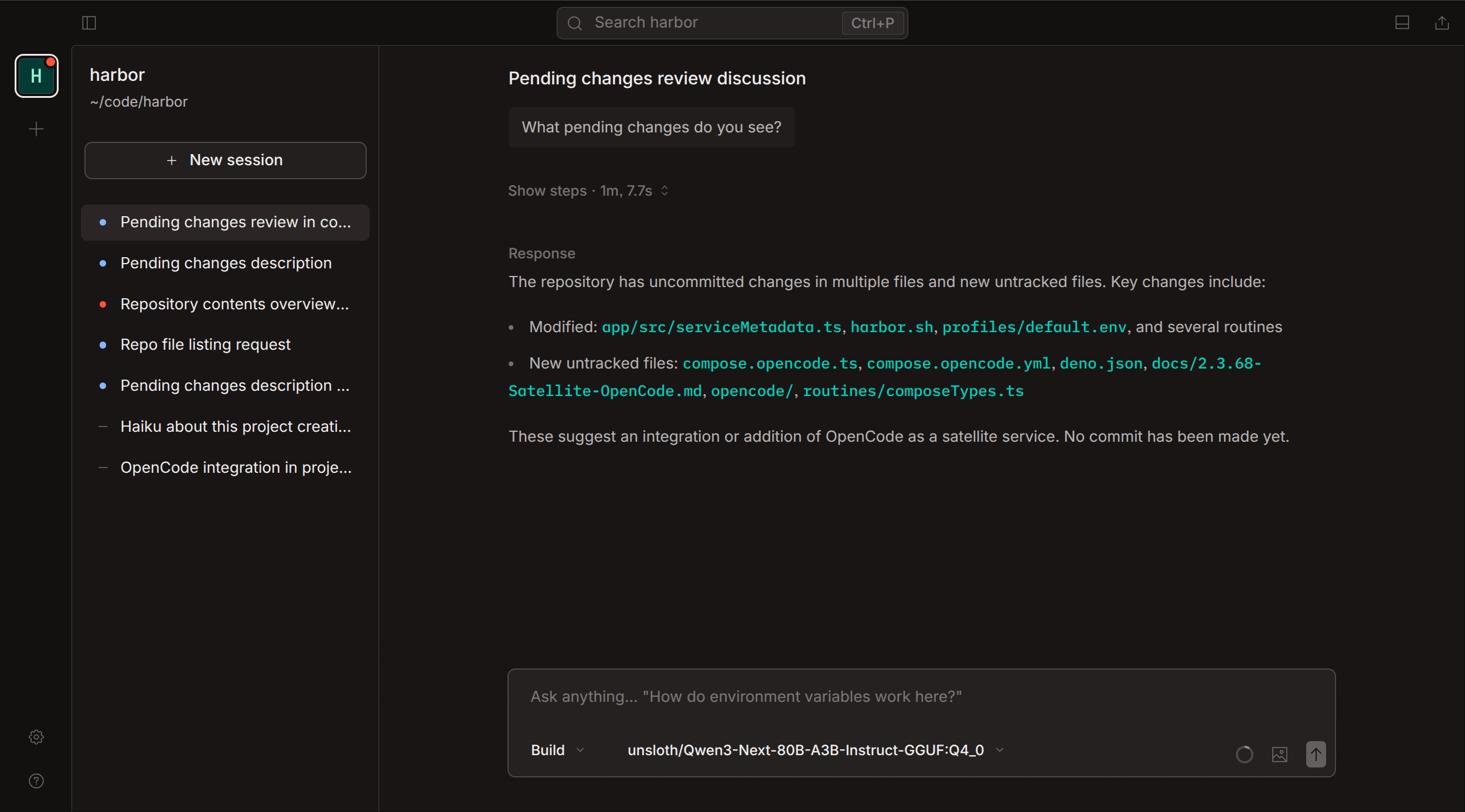
OpenCode is an AI-powered coding assistant that provides a server API, terminal UI, desktop app, and IDE extensions. It supports multiple LLM providers (Anthropic, OpenAI, Google, OpenRouter, etc.), offers advanced agentic workflows with built-in tools (file operations, web search, LSP integration), and enables multi-session management with context awareness.
Key Features:
- Server API with OpenAPI documentation at
/doc - Terminal UI (TUI) via
opencode attach - Multiple LLM provider support (local via Ollama or cloud)
- Built-in tools: file operations, web search, code formatting, LSP integration
- Session management with context compaction
- MCP (Model Context Protocol) server integration
- Plugin system for custom tools and agents
- Workspace-aware file operations
# Pull the image
harbor pull opencode

# Start the service and open its WebUI in the browser
harbor up opencode --open
See harbor pull and harbor up for more options.
- Harbor will connect
opencodetoollama,llamacpp,vllmand other internal inference engines automatically - Harbor discovers available backend models when no OpenCode configuration exists yet
Access the OpenAPI documentation at http://localhost:34711/doc.
The server provides REST and WebSocket endpoints for:
- Session management
- Message streaming
- Agent execution
- Tool invocation
Start OpenCode with harbor-cli when you want agents in the OpenCode container to inspect and manage Harbor services:
harbor up opencode harbor-cliThis mounts the Harbor home directory, Docker socket, /harbor/harbor_cli_init.sh, and the local LLM skill file into the OpenCode container. The image includes the Docker CLI and Compose plugin; run sh /harbor/harbor_cli_init.sh inside the container to place harbor on PATH.
Harbor provides an opencode subcommand to manage workspaces:
# Add a workspace (updates HARBOR_OPENCODE_WORKSPACES)
harbor opencode workspaces add ~/projects/my-app

# Remove a workspace
harbor opencode workspaces rm ~/projects/my-app

# List configured workspaces
harbor opencode workspaces lsOptional basic auth can be configured for the server:
harbor config set opencode.username "myuser"
harbor config set opencode.password "mypassword"
After setting credentials, restart the service for changes to take effect. See harbor config and harbor restart for details.
Following options can be set via harbor config:
# Main server port
HARBOR_OPENCODE_HOST_PORT          34711

# Persistent storage
HARBOR_OPENCODE_DATA               ./services/opencode/data
HARBOR_OPENCODE_CONFIG             ./services/opencode/config

# Basic authentication (optional)
HARBOR_OPENCODE_USERNAME           ""
HARBOR_OPENCODE_PASSWORD           ""

# Workspace mounts (semicolon-separated paths)
HARBOR_OPENCODE_WORKSPACES ""-
HARBOR_OPENCODE_DATA(./services/opencode/data) →/root/.local/share/opencode- Session data, logs, and auth tokens -
HARBOR_OPENCODE_CONFIG(./services/opencode/config) →/root/.config/opencode- Configuration files - Workspace directories (configured via
HARBOR_OPENCODE_WORKSPACES) →/root/<name>- Project files for coding tasks
OpenCode supports mounting multiple workspace directories for file operations.
Edit the HARBOR_OPENCODE_WORKSPACES variable in your profile using harbor config:
# Semicolon-separated list of paths
harbor config set opencode.workspaces "~/projects/app1;~/projects/app2;~/code/lib"
Workspace paths can be:
- Absolute paths:
/home/user/projects/my-app - Relative paths:
./projects/my-app(relative to Harbor home) - Home-relative:
~/projects/my-app
Each workspace is mounted as /root/<basename> in the container.
The harbor opencode workspaces command provides a convenient interface:
# Add workspace
harbor opencode workspaces add ~/projects/my-app

# Remove workspace
harbor opencode workspaces rm ~/projects/my-app

# List workspaces
harbor opencode workspaces lsOpenCode supports automatic model discovery from Harbor inference backends. When starting OpenCode alongside compatible backends, the service automatically detects available models and configures them for use.
The following Harbor backends are supported for auto-discovery:
-
ollama- Ollama inference server -
llamacpp- llama.cpp server -
vllm- vLLM inference engine -
tabbyapi- TabbyAPI (ExLlamaV2) -
mistralrs- mistral.rs inference -
sglang- SGLang inference -
lmdeploy- LMDeploy inference -
unsloth-studio- Unsloth Studio (the cross-integration mounts the bootstrapped API key so the discovered provider authenticates correctly — see Use as an inference backend for other Harbor services) -
litellm- LiteLLM proxy (uses Harbor's configuredlitellm.master.keyfor the model query and generated provider)
When OpenCode starts with one or more compatible backends, the entrypoint script:
- Waits for each backend to become available (30 second timeout per backend)
- Queries the
/v1/modelsendpoint on each backend - Generates an
opencode.jsonconfiguration with discovered providers and models - The backends appear as "BackendName (Harbor)" in the model selector
Discovery runs only if opencode.json is absent or empty and OPENCODE_CONFIG_CONTENT is unset. An existing configuration is preserved across container recreations, including custom providers and model settings. To refresh an auto-generated config, first back it up by renaming services/opencode/config/opencode.json, then restart OpenCode with your chosen backends, for example:
mv services/opencode/config/opencode.json services/opencode/config/opencode.backup.json
harbor down opencode
harbor up --no-defaults opencode litellmStart OpenCode with one or more backends:
# With Ollama
harbor up ollama opencode

# With llama.cpp
harbor up llamacpp opencode

# With multiple backends
harbor up ollama vllm opencode
See harbor up for more startup options.
If auto-discovery is not desired, or for additional providers (Anthropic, OpenAI, etc.), configure models manually in opencode.json located in HARBOR_OPENCODE_CONFIG before starting the service. You can also set OPENCODE_CONFIG_CONTENT in services/opencode/override.env; Harbor leaves that inline configuration untouched. A nonempty manual config is not overwritten on the next harbor up.
For repeatable workspace setup, put an executable init.sh in HARBOR_OPENCODE_CONFIG (by default services/opencode/config/init.sh). Harbor runs it as the host user before model discovery or server startup on every container start. Use it to set up mounted workspaces, repositories, or tools; a failed hook is logged and OpenCode still starts. Keep credentials out of this script and mount only workspaces you trust.
For non-interactive task dispatch, mount a persistent workspace and run the CLI inside the running satellite:
docker exec harbor.opencode opencode run --model harbor-litellm/<model> --dir /root/<workspace> 'Summarize this project'Use a model ID listed by docker exec harbor.opencode opencode models harbor-litellm. Harbor does not automatically push branches or open PRs; those actions require explicit orchestration and credentials.
Configure via environment variables:
-
OPENCODE_AUTO_SHARE- Auto-share sessions -
OPENCODE_ENABLE_EXPERIMENTAL_MODELS- Enable experimental model support
OpenCode supports extensive configuration via environment variables:
# Configuration paths
OPENCODE_CONFIG                    # Path to custom opencode.json
OPENCODE_CONFIG_DIR                # Custom config directory
OPENCODE_CONFIG_CONTENT            # Inline JSON configuration

# Feature flags
OPENCODE_AUTO_SHARE                # Auto-share sessions
OPENCODE_DISABLE_AUTOUPDATE        # Disable update checks
OPENCODE_DISABLE_PRUNE             # Disable data pruning
OPENCODE_DISABLE_DEFAULT_PLUGINS   # Disable default plugins
OPENCODE_DISABLE_LSP_DOWNLOAD      # Disable LSP server downloads
OPENCODE_ENABLE_EXPERIMENTAL_MODELS # Enable experimental models
OPENCODE_DISABLE_AUTOCOMPACT       # Disable context compaction
OPENCODE_ENABLE_EXA                # Enable Exa web search

# Authentication
OPENCODE_SERVER_USERNAME           # Server basic auth username
OPENCODE_SERVER_PASSWORD           # Server basic auth password

# Permissions (inline JSON)
OPENCODE_PERMISSION                # Custom permission configuration
Set these via the service's override.env file:
# Edit services/opencode/override.env
OPENCODE_ENABLE_EXPERIMENTAL_MODELS=true
OPENCODE_AUTO_SHARE=true- Server listens on
0.0.0.0:4096inside the container (mapped to host port 34711) - Session data and auth tokens are persisted in
HARBOR_OPENCODE_DATA - Configuration files are persisted in
HARBOR_OPENCODE_CONFIG - OpenAPI documentation available at http://localhost:34711/doc
- WebSocket endpoint for message streaming:
ws://localhost:34711/api/sessions/{session_id}/stream - Requires workspace mounts for file operations (use
harbor opencode workspace add)
See the Harbor Troubleshooting Guide for general help.
Service won't start:
- Check logs:
harbor logs opencode - Verify port 34711 is not in use:
lsof -i :34711
Can't access files in workspace:
- Ensure workspace is added via
harbor opencode workspaces add - Verify workspace path exists and is readable
- Check volume mounts:
docker inspect harbor.opencode
TUI won't attach:
- Ensure server is running:
harbor ps opencode - Check container logs for errors:
harbor logs opencode
Authentication not working:
- Verify credentials are set:
harbor config get opencode.username - Restart service after changing credentials:
harbor restart opencode
OpenCode starts through a Harbor entrypoint wrapper that chowns /root (which contains the opencode install and the data/config bind mounts) and then drops to your host user via setpriv, so ./services/opencode/data and ./services/opencode/config stay owned by your host user.