


Sketch and take handwritten notes.
Rnote is an open-source vector-based drawing app for sketching, handwritten notes and to annotate documents and pictures. It is targeted at students, teachers and those who own a drawing tablet and provides features like Pdf and picture import and export, an infinite canvas and an adaptive UI for big and small screens.
Written in Rust and GTK4.
Features
- Adaptive UI focused on stylus input
- Pressure-sensitive stylus input with different and configurable stroke styles
- Create many different shapes with the shape tool
- Move, rotate, resize and modify existing content with the selection tool
- Different document expansion layouts ( fixed pages, continuous vertical, infinite in every direction, .. )
- Customizable background colors, patterns, sizes
- Customizable page format
- (Optional) pen sounds
- Reconfigurable stylus button shortcuts
- An integrated workspace browser for quick access to related files
- Drag & Drop, clipboard support
- Pdf, Bitmap and Svg image import
- Documents can be exported to Svg, Pdf and Xopp. Document pages and selections to Svg, Png and Jpeg.
- Save and load the documents in the native
.rnotefile format - Tabs to work on multiple documents at the same time
- Autosave, printing
- CLI for automation
Disclaimer
The file format is still unstable. It might change and break compatibility between versions.
Rnote has a project website: rnote.flxzt.net
Download the official flatpak on Flathub here.

Thanks to dehesselle the app is available on MacOS as an app bundle.
Check out the repository, the latest release can be downloaded here.
Download the Windows installer from the latest release which can be found here.
Install using Winget:
winget install flxzt.rnote
Because the file format still is unstable, downgrading to a specific version might be necessary.
List all available past versions on flathub:
flatpak remote-info --log flathub com.github.flxzt.rnotePick the commit from the desired version and downgrade with:
sudo flatpak update --commit=<commit-hash> com.github.flxzt.rnote After downgrading, the flatpak version can be pinned or unpinned with:
$ flatpak mask com.github.flxzt.rnote
$ flatpak mask --remove com.github.flxzt.rnote
To update to the latest version again, unpin and run flatpak update.
In addition to the UI, a CLI tool is available, providing basic handling of .rnote files for automation. It is included in the flatpak. To execute it, run:
flatpak run --command=rnote-cli com.github.flxzt.rnote help


-
The app does not work properly on X11
X11 is unsupported. Stylus and touch input support is known to be unreliable, and upstream support of X11 (GTK4 UI toolkit and desktop environments) will decrease over time (from lower maintenance, deprecation to removal) so successfully fixing X11-related issues for users isn't feasible anymore. -
Drag & Drop is not working
Ensure that Rnote has permission to access the locations from which you are dragging files. These can be granted in Flatseal, a Flatpak permissions manager. -
Odd location for current file
If the directory displayed in the header title is similar to/run/user/1000/../, Rnote does not have permissions to access the directory. Again, granting them in Flatseal fixes this issue. -
The stylus buttons or moving the canvas with a stylus do not work
Make sure thatlibinputandlibwacomare installed and loaded. -
While hovering over the screen with the stylus, other input events are blocked in some regions of the screen
Some devices apply palm rejection, so your hand does not trigger any action on the screen while using a stylus/drawing tablet. However, this might not be desirable. If your device has a left/right handed setting for your stylus/drawing tablet, make sure it is set correctly. Rnote can't disable this unfortunately (discussed in issue #329). -
Changing the stylus button action in the settings does not work Some stylus models have a button that sends out an "Eraser Tool" event instead of a "Primary button" or "Secondary button" event. Examples for such buttons are the lower button of the HP MPP2.0 Tilt pen or when the back of the Microsoft Surface Pen hovers over the screen. This could result in inconsistent button settings in the shortcuts menu (e.g. the secondary/upper button is actually the primary/lower button, or vice versa).
Rnote doesn't natively support handling "Eraser Tool" events, nor enable remapping an erase button to a Primary/Secondary button. However, a workaround can be used to permanently map a tool to an eraser button
- Hover over the canvas, and press and hold the eraser button on the pen
- Switch to the desired pen style while keeping the button pressed
- When releasing the pressed button, it should switch back to the previous pen style
- The pen style in the "Eraser" mode should now be remembered
To verify what event each pen button sends, you can use
evteston Linux.
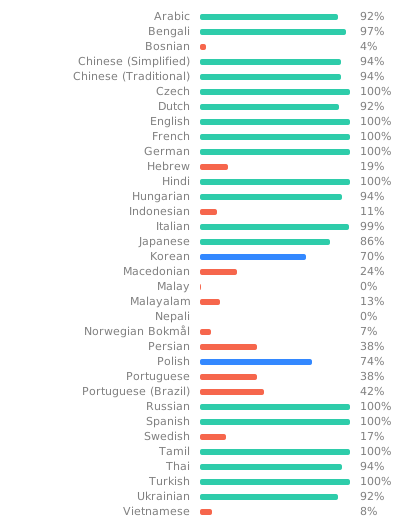
If you want to start contributing by translating, take a look into the translations section of the CONTRIBUTING document.
The following fonts are bundled with the application:
- Grape Nuts: Grape Nuts is a simple handwritten casual font.
- OpenDyslexic-Regular: OpenDyslexic is a typeface designed against some common symptoms of dyslexia.
- TT2020Base-Regular: TT2020 is an advanced, open source, hyperrealistic, multilingual typewriter font for a new decade.
- Virgil: The font that powers Excalidraw.
The .rnote file format is a gzipped json file.
So far breaking changes in the format happened in versions:
v0.2.0v0.3.0v0.4.0v0.5.0
To be able to open and export older files that are incompatible with the newest version, look under Installation /Downgrading to install older versions of Rnote.
Rnote is available under GPL-3.0-or-later. See the LICENSE file for more info.
Copyright (C) 2023  The Rnote Authors

This program is free software: you can redistribute it and/or modify
it under the terms of the GNU General Public License as published by
the Free Software Foundation, either version 3 of the License, or
(at your option) any later version.

This program is distributed in the hope that it will be useful,
but WITHOUT ANY WARRANTY; without even the implied warranty of
MERCHANTABILITY or FITNESS FOR A PARTICULAR PURPOSE.  See the
GNU General Public License for more details.

You should have received a copy of the GNU General Public License
along with this program.  If not, see <https://www.gnu.org/licenses/>.
- A huge thanks to the contributors, translators and to all that donated. You are the ones that help keep the project going!
- Freesound is the source for the pen sounds. The individual sounds are credited in
sounds/Licenses.md - Rough.js provides the algorithms for implementation of Rnote's rough shapes.
- Pizarra is an innovative drawing app with advanced shaping and featuring an infinite zoom. It is a great inspiration of the architecture of Rnote. Go check it out!
If you have any questions or want to start a general discussion, open a topic in the Github Discussions section.
There are also two Matrix chat rooms:
- for users: #rnote:matrix.org
- for developers: #rnote-dev:matrix.org
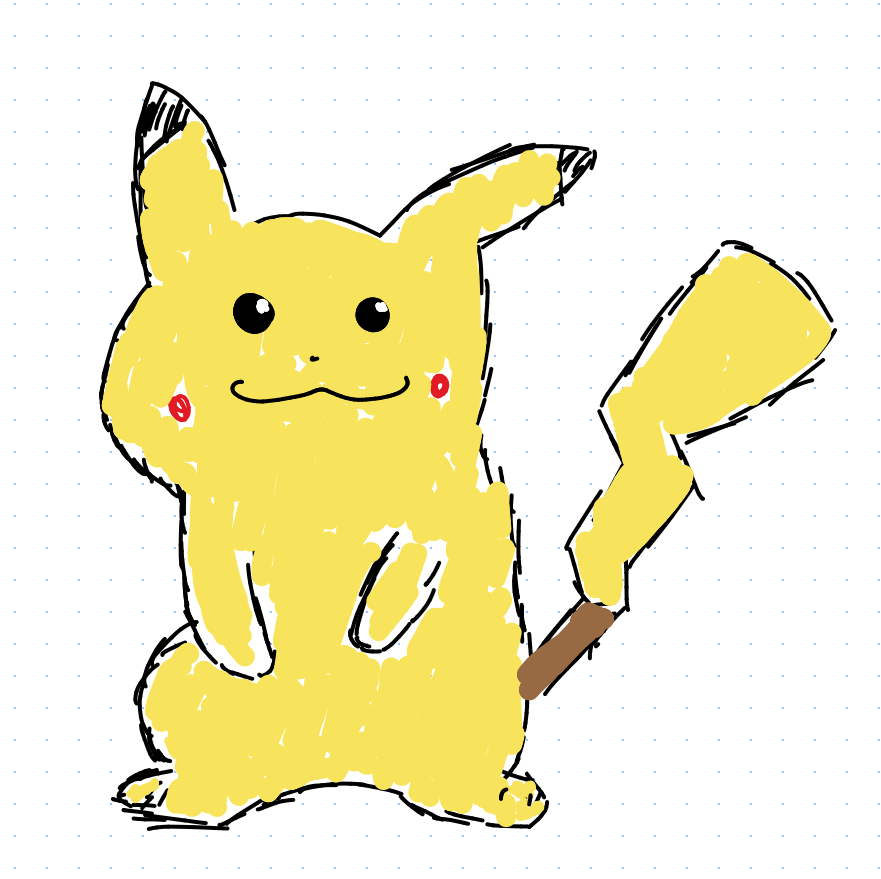
If you have drawn something cool in Rnote and want to share it, submit a PR to add it here. :)

Build instructions for Linux are documented in BUILDING.md and for other platforms here