
Links to my other software archaeology repositories
Elite sources: BBC Micro (cassette) | BBC Micro (disc) | Elite Demonstration Disc | Acorn Electron | 6502 Second Processor | Commodore 64 | Apple II | BBC Master | NES
Elite hacks: Elite-A | Two-player Elite | Teletext Elite | Elite 3D | Elite Universe Editor | Flicker-free Commodore 64 Elite | Elite over Econet | !EliteNet
Elite Compendium: BBC Master | BBC Micro | BBC Micro B+ | Acorn Electron | Commodore 64
Other sources: Aviator (BBC Micro) | Revs (BBC Micro) | The Sentinel (BBC Micro) | Lander (Acorn Archimedes)
Other repositories: Scripts for generating bbcelite.com | Static content for bbcelite.com | Elite source code library | Elite Universe Editor library | Elite over Econet file server menu
See my profile for more repositories to explore.
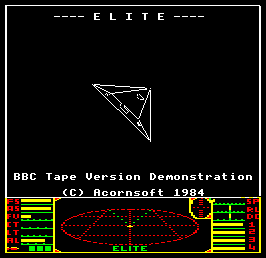
This repository contains source code for the demonstration version of Ian Bell and David Braben's classic game Elite on the BBC Micro, with every single line documented and (for the most part) explained. It has been reconstructed by hand from a disassembly of the original game binaries from the Acornsoft Elite Demonstration Disc.
It is a companion to the elite.bbcelite.com website.
See the introduction for more information, or jump straight into the documented source code.
This repository contains source code for the Acornsoft Elite Demonstration Disc on the BBC Micro, with every single line documented and (for the most part) explained.
You can build the fully functioning game from this source. There is only one variant of the game, which can be found on the disc version of Elite from the Stairway to Hell archive.
This repository is a companion to the elite.bbcelite.com website, which contains all the code from this repository, but laid out in a much more human-friendly fashion. The links at the top of this page will take you to repositories for the other versions of Elite that are covered by this project.
-
If you want to browse the source and read about how Elite works under the hood, you will probably find the website a better place to start than this repository.
-
If you would rather explore the source code in your favourite IDE, then the annotated source is what you're looking for. It contains the exact same content as the website, so you won't be missing out (the website is generated from the source files, so they are guaranteed to be identical). You might also like to read the section on browsing the source in an IDE for some tips.
-
If you want to build the game from the source on a modern computer, to produce a working game disc that can be loaded into a BBC Micro or an emulator, then you want the section on building the Acornsoft Demonstration Disc from the source.
My hope is that this repository and the accompanying website will be useful for those who want to learn more about Elite and what makes it tick. It is provided on an educational and non-profit basis, with the aim of helping people appreciate one of the most iconic games of the 8-bit era.
The Acornsoft Elite Demonstration Disc was written by Ian Bell and David Braben and is copyright © Acornsoft 1984.
The code on this site has been reconstructed from a disassembly of the version released on Ian Bell's personal website.
The commentary is copyright © Mark Moxon. Any misunderstandings or mistakes in the documentation are entirely my fault.
Huge thanks are due to the original authors for not only creating such an important piece of my childhood, but also for releasing the source code for us to play with; to Paul Brink for his annotated disassembly; and to Kieran Connell for his BeebAsm version, which I forked as the original basis for this project. You can find more information about this project in the accompanying website's project page.
Thanks also to Mark Keates for inspiring me to look at the Elite Demonstration Disc in the first place, and for working out the extent of the differences between the cassette and demo versions.
The following archive from Ian Bell's personal website forms the basis for this project:
This repository is not provided with a licence, and there is intentionally no LICENSE file provided.
According to GitHub's licensing documentation, this means that "the default copyright laws apply, meaning that you retain all rights to your source code and no one may reproduce, distribute, or create derivative works from your work".
The reason for this is that my commentary is intertwined with the original source code for Elite, and the original source code is copyright. The whole site is therefore covered by default copyright law, to ensure that this copyright is respected.
Under GitHub's rules, you have the right to read and fork this repository... but that's it. No other use is permitted, I'm afraid.
My hope is that the educational and non-profit intentions of this repository will enable it to stay hosted and available, but the original copyright holders do have the right to ask for it to be taken down, in which case I will comply without hesitation. I do hope, though, that along with the various other disassemblies and commentaries of this source, it will remain viable.
If you want to browse the source in an IDE, you might find the following useful.
-
The most interesting files are in the main-sources folder:
-
The main game's source code is in the elite-source.asm file - this is the motherlode and probably contains all the stuff you're interested in.
-
The game's loader is in the elite-loader.asm file - this is mainly concerned with setup and copy protection.
-
-
The source files for the Demonstration Disc are different to most of the other annotated versions in this project, in that they contain inline diffs. Bell and Braben created the demostration version by taking the original cassette version of Elite and modifying the code to remove functionality that wasn't needed (such as keyboard and joystick support) and add in the self-playing aspects. The annotated source files in this repository contain both the original cassette code and all of their modifications, so you can look through the source to see exactly what they changed in order to create the demonstration version. Any code that they removed from the cassette version is commented out in the source files, so when they are assembled they produce the demonstration binaries, while still containing details of the modifications. You can find all the diffs by searching the sources for
Mod:. -
It's probably worth skimming through the notes on terminology and notations on the accompanying website, as this explains a number of terms used in the commentary, without which it might be a bit tricky to follow at times (in particular, you should understand the terminology I use for multi-byte numbers).
-
The accompanying website contains a number of "deep dive" articles, each of which goes into an aspect of the game in detail. Routines that are explained further in these articles are tagged with the label
Deep dive:and the relevant article name. -
There are loads of routines and variables in Elite - literally hundreds. You can find them in the source files by searching for the following:
Type: Subroutine,Type: Variable,Type: WorkspaceandType: Macro. -
If you know the name of a routine, you can find it by searching for
Name: <name>, as inName: SCAN(for the 3D scanner routine) orName: LL9(for the ship-drawing routine). -
The entry point for the main game code is routine
TT170, which you can find by searching forName: TT170. If you want to follow the program flow all the way from the title screen around the main game loop, then you can find a number of deep dives on program flow on the accompanying website. -
The source code is designed to be read at an 80-column width and with a monospaced font, just like in the good old days.
I hope you enjoy exploring the inner workings of BBC Elite as much as I have.
There are five main folders in this repository, which reflect the order of the build process.
-
1-source-files contains all the different source files, such as the main assembler source files, image binaries, fonts, boot files and so on.
-
2-build-files contains build-related scripts, such as the checksum, encryption and crc32 verification scripts.
-
3-assembled-output contains the output from the assembly process, when the source files are assembled and the results processed by the build files.
-
4-reference-binaries contains the correct binaries for each variant, so we can verify that our assembled output matches the reference.
-
5-compiled-game-discs contains the final output of the build process: an SSD disc image that contains the compiled game and which can be run on real hardware or in an emulator.
This repository also includes a flicker-free version, which incorporates the backported flicker-free ship-drawing routines from the BBC Master. The flicker-free code is in a separate branch called flicker-free, and apart from the code differences for reducing flicker, this branch is identical to the main branch and the same build process applies.
The annotated source files in the flicker-free branch contain both the original Acornsoft code and all of the modifications for flicker-free Elite, so you can look through the source to see exactly what's changed. Any code that I've removed from the original version is commented out in the source files, so when they are assembled they produce the flicker-free binaries, while still containing details of all the modifications. You can find all the diffs by searching the sources for Mod:.
For more information on flicker-free Elite, see the hacks section of the accompanying website.
Builds are supported for both Windows and Mac/Linux systems. In all cases the build process is defined in the Makefile provided.
You will need the following to build the Acornsoft Demonstration Disc from the source:
-
BeebAsm, which can be downloaded from the BeebAsm repository. Mac and Linux users will have to build their own executable with
make code, while Windows users can just download thebeebasm.exefile. -
Python. The build process has only been tested on 3.x, but 2.7 might work.
-
Mac and Linux users may need to install
makeif it isn't already present (for Windows users,make.exeis included in this repository).
For details of how the build process works, see the build documentation on bbcelite.com.
Let's look at how to build the Acornsoft Demonstration Disc from the source.
For Windows users, there is a batch file called make.bat which you can use to build the game. Before this will work, you should edit the batch file and change the values of the BEEBASM and PYTHON variables to point to the locations of your beebasm.exe and python.exe executables. You also need to change directory to the repository folder (i.e. the same folder as make.bat).
All being well, entering the following into a command window:
make.bat
will produce a file called elite-demonstration-disc.ssd in the 5-compiled-game-discs folder that contains the source disc variant, which you can then load into an emulator, or into a real BBC Micro using a device like a Gotek.
The build process uses a standard GNU Makefile, so you just need to install make if your system doesn't already have it. If BeebAsm or Python are not on your path, then you can either fix this, or you can edit the Makefile and change the BEEBASM and PYTHON variables in the first two lines to point to their locations. You also need to change directory to the repository folder (i.e. the same folder as Makefile).
All being well, entering the following into a terminal window:
make
will produce a file called elite-demonstration-disc.ssd in the 5-compiled-game-discs folder that contains the source disc variant, which you can then load into an emulator, or into a real BBC Micro using a device like a Gotek.
By default the build process will create the game with verified binaries. There are two arguments you can pass to the build to change how it works. They are:
-
fix-interlace=yes- By default the game forces interlace to be on, which can cause issues with some monitors and video scalers; this option uses the interlace setting from when the game is run, so you can switch interlace off before running the game with a*TV 0,1command, or you can enable it with*TV 0,0 -
verify=no- Disable crc32 verification of the game binaries
So, for example:
make verify=no
will build the game with no crc32 verification.
See below for more on the verification process.
The default build process prints out checksums of all the generated files, along with the checksums of the files from the original sources. You can disable verification by passing verify=no to the build.
The Python script crc32.py in the 2-build-files folder does the actual verification, and shows the checksums and file sizes of both sets of files, alongside each other, and with a Match column that flags any discrepancies. If you are building an unencrypted set of files then there will be lots of differences, while the encrypted files should mostly match (see the Differences section below for more on this).
The binaries in the 4-reference-binaries folder are those extracted from the demonstration disc, while those in the 3-assembled-output folder are produced by the build process. For example, if you don't make any changes to the code and build the project with make, then this is the output of the verification process:
Results for variant: demo
[--originals--]  [---output----]
Checksum   Size  Checksum   Size  Match  Filename
-----------------------------------------------------------
5386fe2d   5631  5386fe2d   5631   Yes   ELITE.bin
e5d7da7b   5631  e5d7da7b   5631   Yes   ELITE.unprot.bin
a5b92e5b   2132  a5b92e5b   2132   Yes   ELTA.bin
c88a525a   2325  c88a525a   2325   Yes   ELTB.bin
777591e3   2617  777591e3   2617   Yes   ELTC.bin
bba18984   2903  bba18984   2903   Yes   ELTD.bin
1365e1a2   2653  1365e1a2   2653   Yes   ELTE.bin
c2e83ce2   2559  c2e83ce2   2559   Yes   ELTF.bin
179089e3   2340  179089e3   2340   Yes   ELTG.bin
a0a289d3  20712  a0a289d3  20712   Yes   ELTcode.bin
866fa22d  20712  866fa22d  20712   Yes   ELTcode.unprot.bin
00d5bb7a     40  00d5bb7a     40   Yes   ELThead.bin
99529ca8    256  99529ca8    256   Yes   PYTHON.bin
3a24c8b1   3142  3a24c8b1   3142   Yes   SHIPS.bin
f6d180e5   1014  f6d180e5   1014   Yes   WORDS9.bin
All the compiled binaries match the originals, so we know we are producing the same final game as on the demonstration disc.
During compilation, details of every step are output in a file called compile.txt in the 3-assembled-output folder. If you have problems, it might come in handy, and it's a great reference if you need to know the addresses of labels and variables for debugging (or just snooping around).
For users of the excellent b2 emulator, you can include the build parameter b2 to automatically load and boot the assembled disc image in b2. The b2 emulator must be running for this to work.
For example, to build, verify and load the game into b2, you can do this on Windows:
make.bat all b2
or this on Mac/Linux:
make all b2
If you omit the all target then b2 will start up with the results of the last successful build.
Note that you should manually choose the correct platform in b2 (I intentionally haven't automated this part to make it easier to test across multiple platforms).
Right on, Commanders!
Mark Moxon