


SuPi (short for Super Pi) is an open-source TypeScript extension stack for the Pi coding agent. It adds LSP and Tree-sitter code intelligence, semantic refactoring, parallel code review, web and Context7 documentation access, structured ask-user forms, scoped skill controls, quick skill input, and context/session observability.
Install the recommended stack or pick only the packages you need. You keep prompting Pi normally; SuPi gives the agent additional tools and context it can use directly.
If SuPi helps you, give the repository a star on GitHub. Stars help other Pi users find the project.
SuPi is pre-release. Packages marked beta are the fastest-moving parts of the stack.
Most coding agents can read files and search text. @mrclrchtr/supi-code-intelligence gives Pi direct, model-callable access to two complementary sources of code intelligence:
- Language servers (LSP) provide types, definitions, references, implementations, diagnostics, workspace symbols, and semantic refactoring.
- Tree-sitter ASTs provide syntax, outlines, source structure, structural search, and outgoing calls.
The agent receives focused code_* tools for workspace orientation, precise symbol inspection, relationship analysis, code-aware search, live health, and safe refactor previews. Results disclose their evidence and say when semantic or structural analysis is unavailable instead of silently guessing.
Tree-sitter support is bundled. Full LSP features require the matching language-server binary on PATH; see the Code Intelligence setup and screenshots.
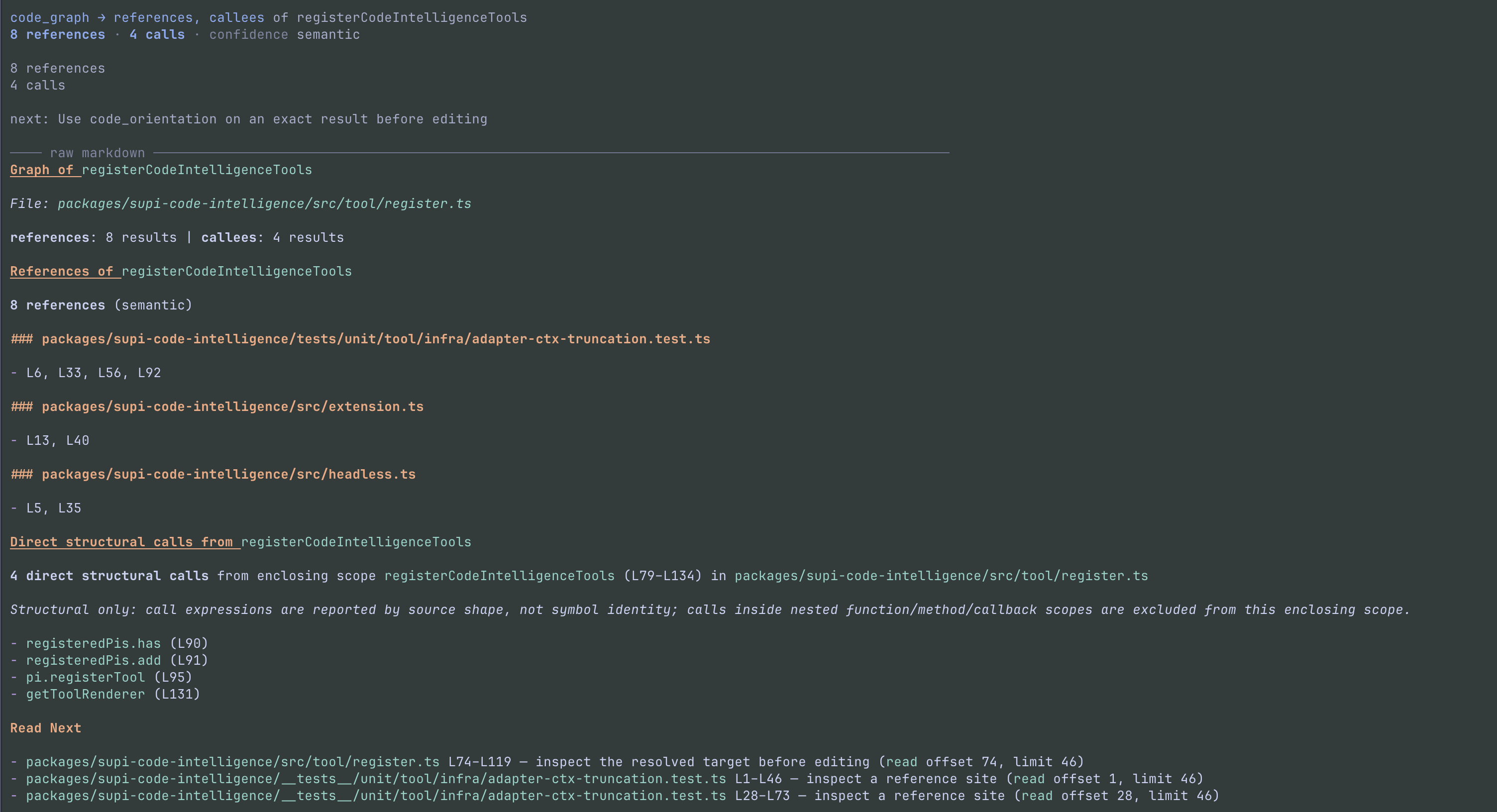
See all Code Intelligence screenshots →
- Web access built for agents —
supi-webprefers source Markdown, extracts readable content from public HTML, fences plain-text files, and moves long pages to temporary files instead of flooding the context window. - Focused library docs — search Context7 for the right project and version, then retrieve documentation narrowed to the current task.
- Structured decisions — ask you focused choice or text questions through a keyboard-driven form with
supi-ask-user. - Review workflows — run independent, inspection-only reviews of exact Git targets with
supi-review. - Agent Profile policy — discover explicit
exploreandgeneralprofiles with bounded resource envelopes throughsupi-agent. - Operational awareness — inspect context pressure, cache history and forensics, and SuPi debug events with
supi-context,supi-cache, andsupi-debug. PI owns live cache statistics and cache-miss notices. - Repository guidance — maintain
CLAUDE.mdandAGENTS.mdfiles with the skills insupi-claude-md. - Skills on your terms — use
supi-skillsto choose, globally or per project, whether Pi can select each skill automatically, whether only you can start it, or whether it is disabled. Type$to search and start installed skills without remembering their full command names. - Session polish — use
supi-extrasto choose session-only tool visibility and, withsupi-skills, skill visibility. It also adds prompt stashing, activity indicators, and shortcuts.
After any installation, run /reload or restart Pi.
Global installation:
curl -fsSL https://raw.githubusercontent.com/mrclrchtr/supi/main/scripts/install.sh | bashProject-local installation into .pi/settings.json:
curl -fsSL https://raw.githubusercontent.com/mrclrchtr/supi/main/scripts/install.sh | bash -s -- -lGlobal installation:
curl -fsSL https://raw.githubusercontent.com/mrclrchtr/supi/main/scripts/install-all.sh | bashProject-local installation into .pi/settings.json:
curl -fsSL https://raw.githubusercontent.com/mrclrchtr/supi/main/scripts/install-all.sh | bash -s -- -lPi extensions run with your user permissions. Review
install.shorinstall-all.shbefore piping either script to a shell.
Every extension package is independently installable:
pi install npm:@mrclrchtr/supi-code-intelligencepi install npm:@mrclrchtr/supi-web| Package | What it adds | Install |
|---|---|---|
supi-code-intelligence |
Direct LSP- and AST-backed code understanding, navigation, search, health, and refactoring tools | pi install npm:@mrclrchtr/supi-code-intelligence |
supi-web |
Public-page-to-Markdown fetching, public web source search, context-safe large output, and focused Context7 documentation | pi install npm:@mrclrchtr/supi-web |
supi-ask-user |
Structured choice and text forms for focused agent-user decisions | pi install npm:@mrclrchtr/supi-ask-user |
supi-context |
Context-pressure snapshots and detailed TUI usage reports | pi install npm:@mrclrchtr/supi-context |
supi-settings |
One project/global settings UI for SuPi packages | pi install npm:@mrclrchtr/supi-settings |
supi-skills |
Scoped skill controls and $skill-name input shortcuts |
pi install npm:@mrclrchtr/supi-skills |
supi-extras |
Session capability controls, prompt stash, shortcuts, and activity indicators | pi install npm:@mrclrchtr/supi-extras |
supi-prompt-suggestions |
Advisory ghost-text suggestions from a model you choose | pi install npm:@mrclrchtr/supi-prompt-suggestions |
The root skills/ catalog contains SuPi-compatible editions of selected third-party skills. Install only the skills you need:
npx skills add mrclrchtr/supi --skill code-review researchsupi-skill-patches is the private maintenance workspace that synchronizes and validates this catalog.
Not part of the recommended release stack. Included in the full-stack installer (install-all.sh), or install separately:
| Package | What it adds | Install |
|---|---|---|
supi-debug |
Debug-event capture, troubleshooting tools, and post-task tooling feedback via /supi-tooling-retro |
pi install npm:@mrclrchtr/supi-debug |
Most packages in this section are installed by install-all.sh on top of the release stack. supi-consulting is an opt-in Agent package and is not included in either installer:
| Package | What it adds | Install |
|---|---|---|
supi-review |
Caller-defined, inspection-only reviews in managed child sessions | pi install npm:@mrclrchtr/supi-review |
supi-agent |
Explicit Agent Profile catalogue and child resource policy | pi install npm:@mrclrchtr/supi-agent |
supi-consulting |
Agent — bounded consultations with explicit agent and workspace selection and observed evidence; currently supports Antigravity | pi install npm:@mrclrchtr/supi-consulting |
supi-cache |
Prompt-cache history and cross-session regression forensics | pi install npm:@mrclrchtr/supi-cache |
supi-insights |
Historical session analytics and shareable HTML reports | pi install npm:@mrclrchtr/supi-insights |
supi-claude-md |
Skills for auditing and revising repository instruction files | pi install npm:@mrclrchtr/supi-claude-md |
supi-bash-timeout |
Default timeouts so forgotten shell limits do not stall the session | pi install npm:@mrclrchtr/supi-bash-timeout |
These packages power the stack and are not standalone Pi extensions:
supi-lsp— Language Server Protocol runtime bundled by Code Intelligence.supi-tree-sitter— structural AST analysis bundled by Code Intelligence.supi-code-runtime— shared code-intelligence contracts and workspace capability state.supi-agent-runtime— neutral in-memory Agent Run lifecycle, usage accounting, and bounded diagnostics for extension-owned adapters.supi-core— common configuration, settings, reporting, and session infrastructure.supi-test-utils— shared test helpers for SuPi packages.
The release stack includes supi-settings. Open the shared settings UI with:
/supi-settings
Press Tab to switch between project and global scope. Settings show whether each value comes from the project, global configuration, or its default.
supi-skills adds a searchable Skills section to /supi-settings. Each installed skill can be:
- Enabled — Pi can select the skill automatically, and you can start it explicitly.
- Model invocation disabled — only you can start the skill explicitly.
- Disabled — Pi does not load the skill or its command.
At the prompt, type $ and part of a skill name. Select a result to insert $skill-name; SuPi runs it as /skill:skill-name when you submit. For example, if code-review is installed:
$code-review Review the current changes.
Project choices inherit your global choices. Run /reload after you change whether a skill loads, or after you add or remove skills. Install supi-extras to hide model-visible skills for one session. This does not change explicit skill commands or $skill-name shortcuts.
The release installers include both supi-skills and supi-settings. For a standalone installation with skill controls, install both packages:
pi install npm:@mrclrchtr/supi-settings
pi install npm:@mrclrchtr/supi-skills
Install @mrclrchtr/supi-extras to manage session-only skill visibility with /supi-capabilities.
Update installed Pi packages:
pi update --extensionsRemove the SuPi stack (release + beta packages):
curl -fsSL https://raw.githubusercontent.com/mrclrchtr/supi/main/scripts/uninstall.sh | bashFor project-local removal, add -l:
curl -fsSL https://raw.githubusercontent.com/mrclrchtr/supi/main/scripts/uninstall.sh | bash -s -- -lRemove one package:
pi uninstall npm:@mrclrchtr/supi-webRun /reload or restart Pi after removing extensions.
SuPi improves with your feedback. After a task, run /supi-tooling-retro to produce a compact retrospective of the SuPi surfaces you used — what helped, what fell short, what was missing, and what was noisy. This prompt template ships with the supi-debug DevTool package:
pi install npm:@mrclrchtr/supi-debugShare the result, or any friction you find in SuPi tools, prompts, skills, or injected context, as a GitHub issue.
If SuPi is useful to you, consider giving it a star as well.